QR Code Types
Wi-Fi QR Codes
Encodes a network's name and password — scanning it offers to join the Wi-Fi network directly, no typing required. This is the same format ("ZXing" format) every major phone's native camera scanner understands.
How to create one
- Open the Wi-Fi QR code generator — it opens on the Wi-Fi type with the fields ready to fill in.
- Enter the network name (SSID) and choose the security type: WPA/WPA2, WEP, or No password.
- If it's password-protected, enter the password. Check Hidden network if the SSID isn't broadcast.
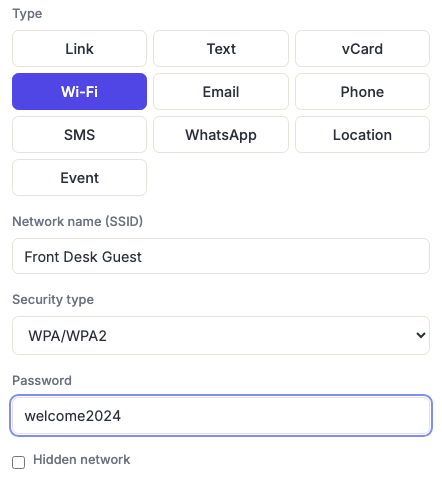
Getting the fields right
- The SSID must match exactly — including capitalisation and any spaces. It's not a display name; it's what the phone matches against the networks it can see. "Cafe Guest" and "cafe guest" are different networks.
- Pick the right security type. WPA/WPA2 covers essentially every modern network, including WPA3 in practice. WEP is long-obsolete and only there for old hardware. Choosing No password hides the password field entirely, since there's nothing to encode.
- Hidden network matters. If the SSID isn't broadcast, the phone won't find the network by name alone, and the code fails without this box checked. If it is broadcast, leave it unchecked.
- Special characters are handled for you. Semicolons, colons, commas, backslashes and quotes are field delimiters in this format, so a password containing one would otherwise corrupt everything after it. The generator escapes them automatically — paste your real password as-is.
When to use it
Guest Wi-Fi at a café, hotel room, office lobby, Airbnb, or event venue — anywhere people would otherwise have to ask staff for the password or squint at a handwritten sign. It removes both the typing and the transcription errors, which is most of the friction.
It also makes long, genuinely strong guest passwords practical for the first time. If nobody has to type it, there's no reason for it to be short.
Understand what you're printing
The password is inside the code in plain text. There's no encryption and no lookup — anyone who scans it, or photographs it and decodes it later, has your password. That's how the format works, on every generator.
So treat a printed Wi-Fi code as equivalent to writing the password on the wall, because functionally it is. For a café that's fine. For your main office network, it isn't — put guests on a separate guest network and generate the code for that one, so a leaked password gives access to the internet rather than to your file server and printers.
A Wi-Fi code is also permanently static: it cannot be a dynamic code, because the phone reads the credentials straight out of the pattern and never contacts a server. Change the password, and every printed code becomes wrong at once.
Frequently asked questions
Does this work on both iPhone and Android?
Yes. Both platforms' built-in camera apps recognise this format and offer to join the network — iOS since iOS 11, Android since Android 10 natively (and earlier via Google Lens). It's one of the most reliably supported QR types there is.
Someone scanned it and nothing happened. Why?
Most often the phone isn't in range of the network — the prompt only appears when the SSID is actually visible, or when Hidden network is checked. After that, check the SSID for a typo or wrong capitalisation, and confirm the security type matches. A third-party scanner app is also a common cause: many just show the raw WIFI: text instead of acting on it. Use the built-in camera app.
Do I need to reprint when the password changes?
Yes — the credentials are baked into the pattern, so an old code simply fails. If you rotate guest passwords on a schedule, that's worth planning around: keep the printed code somewhere easy to swap, like a table tent, rather than laminated onto a wall.
Why is my Wi-Fi code so much denser than a link code?
Because it encodes more — the SSID, the password and the security type, rather than a short URL. More data means a finer grid, and a finer grid needs a larger printed size to stay scannable. Keep it at least a couple of inches across on a table tent, and see the sizing guide if it's going somewhere further away.
Can I add my logo to a Wi-Fi code?
You can, but be conservative. Wi-Fi codes are dense, and the denser the code the less a logo can safely cover — the generator will warn you when the combination gets risky. Keep the logo small and test the printed proof with a real phone. See shapes and logo embedding.