How QR Codes Work
The full technical picture: every structural region in the grid, the four encoding modes and their densities, how masking stops large blank patches from confusing scanners, and what the 40 versions actually mean.
Guide
A QR code looks simple from the outside. A black-and-white square you point a camera at. Underneath it's a deliberately engineered data structure, with fixed landmarks that let a scanner find it at any angle, a choice of encoding modes, and enough mathematical redundancy that a third of the code can be destroyed and it still reads. This guide covers the whole picture, then branches into the details.
A QR code, short for "Quick Response" code, is a two-dimensional barcode: a grid of small black and white squares, each called a module: that together encode a string of text. That string might be a web address, a phone number, a Wi-Fi password, or a contact card, but at the level of the code itself there's no difference. It's all just text. What makes a scanned QR code do something is a formatting convention that the scanning app recognizes, which we cover in types of QR codes.
The "two-dimensional" part is the whole breakthrough. A traditional retail barcode varies only along one axis. The widths of its bars left to right. Its height carries no information at all; it's there purely so a laser scanner sweeping across at a slight angle still crosses every bar. A QR code varies along both axes, so every one of its modules is a meaningful bit.
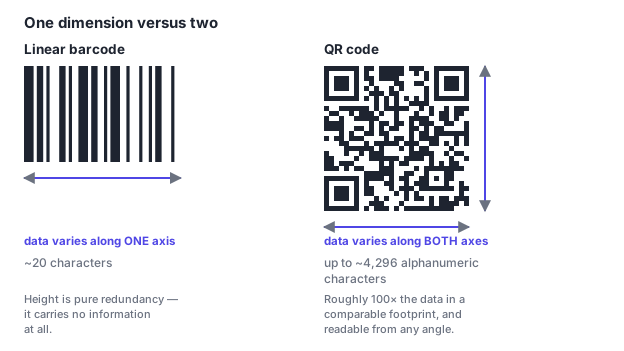
That density is why QR codes replaced barcodes for anything that needs to carry a URL. It's also why they survive being read by a phone camera held at a careless angle in bad light, which we'll get to.
Almost none of a QR code is random. Before a single bit of your data is placed, the encoder reserves specific regions of the grid for fixed structural elements whose entire job is to make the code findable and readable. Here's a real version 3 code with those regions color-coded.
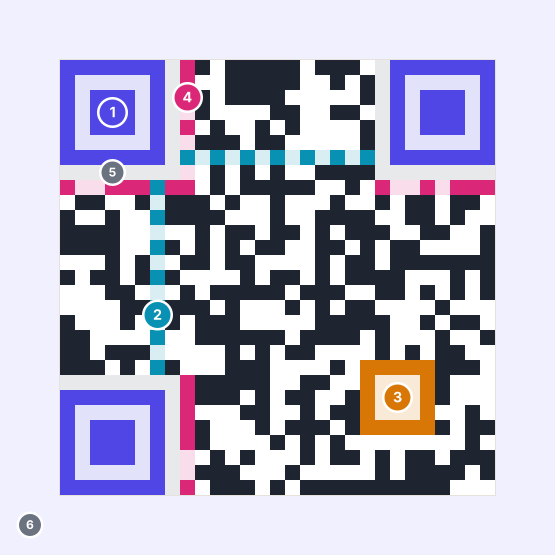
Codes at version 7 and above add one more fixed element: two version information blocks that state the grid size explicitly, so a scanner doesn't have to infer it by counting. Everything left over after all of this is reserved is where your actual content lives, interleaved with its error correction data.
The gap between pointing a camera and getting a result is usually well under a second, but a surprising amount happens in it. The scanner never "reads the picture". It works through a fixed sequence.
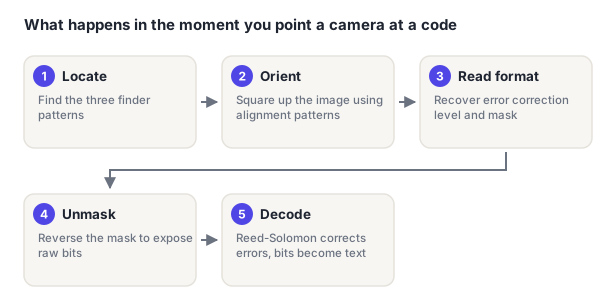
Two things in that sequence are worth internalizing, because they explain most real-world failures. First, everything depends on finding the finder patterns. Which is why covering a corner with a logo breaks a code in a way that no amount of error correction can repair, and why a missing quiet zone stops a scan before it starts. Second, the format information has to be recovered before the data can be, which is why that small strip beside the finders is duplicated on the opposite side of the code.
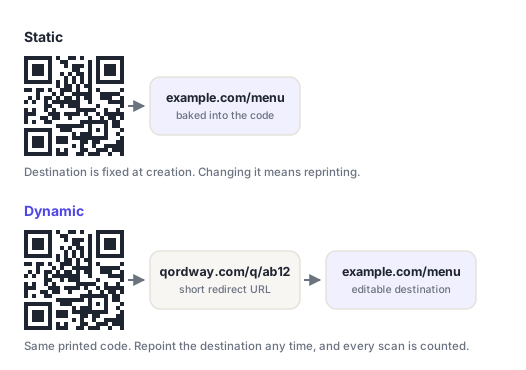
If you take one practical thing from this page, make it this one. It's the choice you can't reverse after printing.
| Static | Dynamic | |
|---|---|---|
| Change the destination later | No (reprint required) | Yes, any time |
| Scan analytics | None possible | Scan counts, times, device, rough location |
| Works with no internet | Yes, for text/Wi-Fi/vCard payloads | No (the redirect needs a network) |
| Depends on a service staying online | No | Yes, indefinitely |
| Visual density | Grows with payload length | Always small (the URL is short) |
| Account required | No | Usually |
The rule of thumb: static for anything permanent and self-contained: a Wi-Fi password by the guest room door, a vCard on your own business card, a serial number on a part. Dynamic for anything printed at volume or tied to a campaign, because the value of being able to fix a wrong link on 5,000 already-printed flyers is enormous, and you only appreciate it the one time you need it.
There's a subtler benefit too. Because a dynamic code encodes a short redirect rather than your real URL, it stays visually simple even when the destination is a 200-character link with tracking parameters attached. A sparser grid means larger modules at the same print size, which scans more reliably.
"Version" in the QR specification means grid size, not a revision number. There are 40 of them, from version 1 at 21×21 modules up to version 40 at 177×177, each step adding four modules per side. Your generator picks the smallest version that fits what you're encoding at the error correction level you chose.
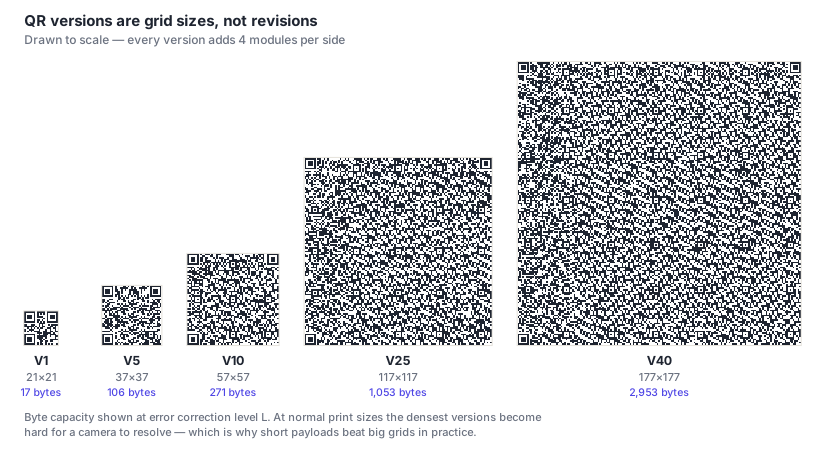
Capacity also depends on what you encode, because the encoder picks a mode to suit the character set. Digits pack at about 3.33 bits each; general UTF-8 text costs 8 bits per character. At the absolute maximum (version 40, error correction L) a QR code holds 7,089 digits, 4,296 alphanumeric characters, or 2,953 bytes of arbitrary text.
Maximum capacity is close to useless in practice. A version 40 code printed at business-card size has modules far too small for a phone camera to resolve. Real-world codes almost always sit under version 10, and keeping the payload short is a far better reliability strategy than raising error correction.
Every QR code carries redundant data generated with Reed-Solomon error correction: the same family of algorithm used on CDs, DVDs and deep-space radio links. It lets a scanner mathematically reconstruct modules it couldn't read, whether they were torn, smudged, badly printed, or covered by a logo on purpose.
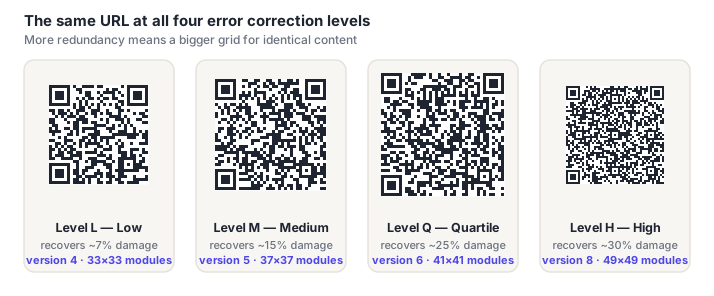
There are four standardized levels, and choosing one is a straight trade between damage tolerance and size:
| Level | Recovers | Use it when |
|---|---|---|
| L (Low | ~7% | On-screen display, or print that will stay pristine |
| M) Medium | ~15% | The sensible default for most printed material |
| Q (Quartile | ~25% | Outdoor signage, labels, anything handled repeatedly |
| H) High | ~30% | Mandatory if a logo sits on the code |
The code itself never expires. It's just a printed pattern, and the data encoded in it doesn't decay. What can expire is what sits behind it. A static code pointing at a URL stops being useful when that page goes away. A dynamic code stops working if the redirect service that operates it shuts down or the code's owner stops paying for it. Some commercial generators deliberately expire free dynamic codes after a trial period, which is worth checking before you print anything.
Not directly. A QR code holds text, and text alone can't execute. The genuine risk is that the text is a link to a malicious site, and that scanning it takes you there before you've had a chance to read the address. A technique sometimes called "quishing." Every modern phone camera shows the destination as a preview rather than opening it automatically, so the practical defense is simply to read that preview before tapping, especially for codes stuck on parking meters, posters or restaurant tables where anyone could have pasted a sticker over the original.
Two reasons, and they compound. Longer content needs a larger grid, and a higher error correction level needs a larger grid for the same content. A short link at level L might produce a 21×21 code; the same link with a long tracking string attached at level H can easily triple the module count. Since the printed size usually stays fixed, each module gets physically smaller. Which is precisely why dense codes scan worse.
Denso Wave, which invented the format in 1994, holds patents on it but chose from the outset not to exercise its rights over the standardized specification. The format is published as an open ISO standard (ISO/IEC 18004), so generating and scanning QR codes is free for anyone, commercially included. What is sometimes charged for is the service around a code (dynamic redirects, hosting, analytics) never the code format itself. Our guide to free vs. paid generators covers which of those services are worth paying for.
A practical floor is about 2 cm (0.8 in) square for a short payload scanned at arm's length, though the real constraint is the size of an individual module rather than the code overall. The general guideline is the 10:1 rule: the printed width should be roughly one tenth of the distance it'll be scanned from. A menu code read at 30 cm needs about 3 cm; a poster read across a hallway needs far more.
Yes, and it's well supported, error correction exists precisely to reconstruct obscured modules. Three rules keep it reliable: use error correction level H, keep the logo at or below about 15% of the code's area (roughly 38% of its width), and never let it touch the three finder patterns in the corners. Those corners are structural rather than data, so covering them causes a failure that no error correction can repair. Note that 15% is deliberately stricter than the 20–30% figure repeated across most guides — we tested it against a real scanner and 20% already fails.
The full technical picture: every structural region in the grid, the four encoding modes and their densities, how masking stops large blank patches from confusing scanners, and what the 40 versions actually mean.
Static vs. dynamic in depth, plus every content type a code can carry (URL, vCard, Wi-Fi, email, SMS, geolocation, calendar event) with the exact payload format each one uses and the quirks worth knowing before you print.
How Reed-Solomon redundancy actually reconstructs missing modules, what each of the four levels costs you in size, and how to choose one for real printing conditions rather than in the abstract.
Step by step on iPhone and Android, what to do when the camera won't recognize a code, how to scan one that's already saved as an image on your own screen, and how to scan from a laptop.
Full capacity tables for all four encoding modes and all four error correction levels, the 10:1 sizing rule with worked examples, and minimum print sizes for menus, packaging, posters and billboards.
Why a Toyota Group parts supplier invented a barcode replacement in 1994, how a game of Go inspired the finder patterns, and why the decision not to enforce the patent is the reason you can read this page.
What you genuinely get for money, which paid features are really just client-side rendering, and the one question about cancellation that catches people out after they've printed.