QR Code Basics
QR Code Error Correction Levels Explained
A QR code can still scan correctly when it's torn, smudged, badly printed, partly rained on, or deliberately covered by a logo. That resilience comes from Reed-Solomon error correction (the same family of algorithm used on CDs, in RAID arrays and on deep-space radio links) built into every code. Understanding how it works, and where it stops working, is what lets you pick a level for how a code will genuinely be used rather than guessing.
The short version
- Four levels: L (~7%), M (~15%), Q (~25%), H (~30%) of the code recoverable.
- More redundancy means a bigger grid for the same content. There's no free lunch.
- M is the right default for most printed material.
- H is mandatory whenever a logo sits on the code. Nothing lower is safe.
- Error correction cannot repair damage to the finder patterns. Those are structural, not data.
- Past a point, raising the level makes scanning worse, because the extra modules shrink below what a camera can resolve.
How error correction actually works
When a code is generated, the encoder doesn't just write your data into the grid. It also computes additional redundant symbols using Reed-Solomon coding and interleaves them with the original data across the whole code. A scanner that can't read some modules uses those symbols to reconstruct the missing values mathematically, much as a RAID array rebuilds a failed disk from parity held on the others.
Two details make this more powerful than it first sounds. The redundancy is interleaved rather than appended, so damage concentrated in one physical area (a coffee ring, a tear, a sticker) gets spread across many different data blocks, and no single block loses enough to be unrecoverable. And Reed-Solomon works on symbols, meaning it repairs whole bytes rather than individual bits, which matches how physical damage actually behaves.
The cost is capacity. Redundant symbols occupy modules that would otherwise hold your content, so the same data needs a larger grid as the level rises.
The four levels, and what they cost
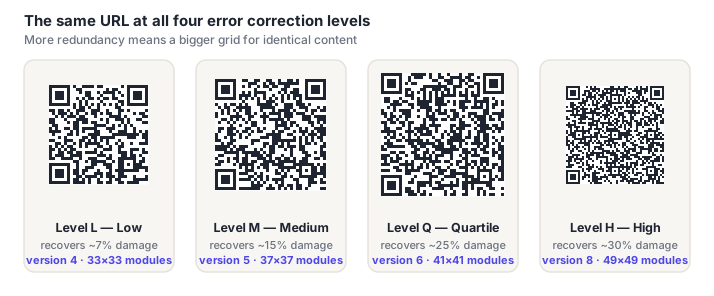
Below is one identical URL, a realistic 63-character campaign link, encoded at each of the four levels. Same content every time; the only variable is redundancy.
| Level | Recovers | Capacity cost | Right for |
|---|---|---|---|
| L (Low) | ~7% | Baseline | Screens, digital display, print kept in pristine condition. Produces the smallest, least dense code. |
| M (Medium) | ~15% | ~20% less data | The sensible default. Flyers, packaging, most general print. What most generators use when you don't specify. |
| Q (Quartile) | ~25% | ~40% less data | Outdoor signage, warehouse and asset labels, anything handled repeatedly or exposed to weather. |
| H (High) | ~30% | ~55% less data | Any code with a logo on it. Also curved, textured or industrial surfaces with inconsistent print quality. |
To make the capacity cost concrete, here's the same version 10 grid holding very different amounts of content depending on level:
| Version 10 (57×57) | L | M | Q | H |
|---|---|---|---|---|
| Numeric digits | 652 | 513 | 364 | 288 |
| Alphanumeric | 395 | 311 | 221 | 174 |
| Bytes (UTF-8 text) | 271 | 213 | 151 | 119 |
Going from L to H on the same grid costs you more than half your capacity. That's the trade in its rawest form.
Logos: the case where H isn't optional
Placing a logo in the center of a code is the most common deliberate use of error correction, and it works. The covered modules are simply treated as unreadable and reconstructed. But the budget is finite, and people routinely overspend it.
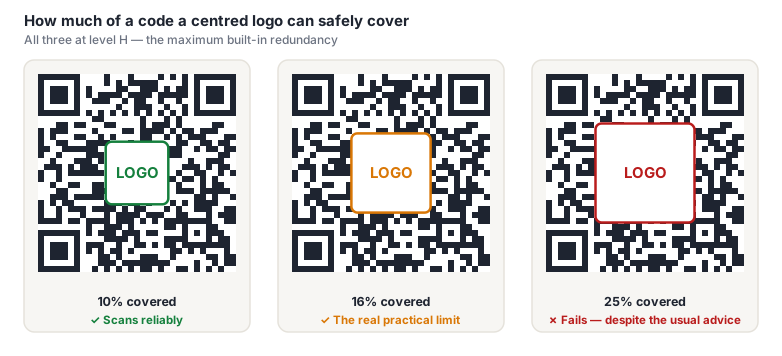
Almost every guide on the web, and plenty of QR generators, will tell you a logo can safely cover 20–30% of a code's area at level H. We tested it, sweeping coverage levels against a real barcode detector across several code versions, and the cliff sits between 16% and 20%. A 20% logo already fails with a clean digital render and a perfect quiet zone, which is a kinder environment than any print job.
The mismatch comes from what "recovers ~30%" actually means: it's a budget measured across the whole symbol in codewords, and a solid block in the middle destroys entire codeword blocks rather than the scattered errors the scheme is tuned for.
Three rules keep a logo safe:
- Use level H, always. A logo is deliberate damage. Nothing below H leaves enough margin, and a code that scans on your desk at level M can fail on a lower-quality print run or a worse camera.
- Keep coverage at or below about 15% of the code's area: roughly 38% of its width, since this is area, not width. A logo half as wide as the code already covers 25% of its area, which our own testing puts past the failure point.
- Never overlap the finder patterns. The three corner squares are structural. A scanner uses them to locate and orient the code before error correction is available, so damage there is unrecoverable no matter what level you chose.
Adding a small blank ring around the logo rather than letting it bleed into surrounding modules also helps, by giving the scanner a clean boundary instead of ambiguous partial modules. Our design best practices guide covers the visual side in more depth.
Choosing a level in practice
Two questions settle it almost every time: how much physical wear will this code see, and is anything sitting on top of it?
- Neither applies. A code on a web page or a slide: L is fine and keeps the grid as simple as possible.
- Ordinary print: flyers, receipts, packaging inserts, business cards: M.
- Real-world abuse: outdoor signage, shipping labels, equipment tags, anything laminated or handled daily: Q.
- A logo, or a hostile surface: curved bottles, textured card, thermal printers, industrial marking: H.
Raising the error correction level can make a code scan worse. Higher levels need more modules, and at a fixed print size more modules means each one is physically smaller. Push far enough and the camera can no longer resolve individual modules. A failure mode error correction can't help with, because the scanner isn't misreading modules, it's failing to see them at all.
When a code must be both small and robust, shortening the payload does far more than raising the level. A dynamic code with a 25-character redirect URL will out-scan a static code carrying a 200-character tracking link at every correction level.
Practical sequence when a code has to survive difficult conditions: shorten the payload first, increase the physical size second, and only then raise the correction level. That ordering reflects which lever actually buys the most reliability per unit of cost.
Frequently asked questions
Does a higher error correction level make a QR code more secure?
No. It's unrelated to security. Error correction protects against physical damage and misreading, not against anyone reading your data. A QR code is not encrypted at any level, and anyone who scans it sees exactly what's encoded. If content needs to be private, the code should point at something access-controlled rather than containing the sensitive data itself.
What happens if a code is damaged past its correction level?
It fails cleanly rather than returning wrong data. Reed-Solomon can detect that more symbols are corrupt than it can repair, so the scanner reports a failed read instead of silently decoding to something incorrect. In practice you see a camera that simply never recognizes the code. That fail-safe behavior is why a partially destroyed code never sends anyone to a wrong URL.
Can I tell which error correction level a code uses just by looking?
Not by eye, but the information is in there, the format information strip beside the finder patterns encodes it in two bits, which is how the scanner knows. Comparing two codes with identical content, the physically larger grid is the higher level. Across codes with different content, size tells you nothing, since payload length affects the version too.
Why does my code with a logo scan on my phone but not my colleague's?
Classic sign of a code sitting right at its recovery limit. Cameras, decoding libraries and lighting differ enough that a marginal code passes on one device and fails on another. And the device it fails on is invariably a customer's. Treat inconsistent scanning as a failure, not a partial success: reduce the logo, switch to level H if you haven't, or make the code larger.
Is level H always the safest choice?
Only when something is covering the code. Otherwise H forces a denser grid for no benefit, and that density is itself a scanning risk at small print sizes. For a clean code with nothing on top of it, M gives ample real-world tolerance while keeping modules comfortably large. Defaulting everything to H is a common and slightly counterproductive habit.