Use Cases
QR Codes for Retail & Product Packaging
Packaging is the only place a QR code has two completely different audiences: a shopper deciding whether to buy, and an owner who already has. Those people want opposite things, and the code that tries to serve both usually serves neither. Which is why so many packaging codes end up pointing at a homepage and getting almost no use.
This page is about what to do with a code on a product: what to link to, where to place it, how it fits a retail context. The physical production problem: curvature, substrates, print processes, finishes, is covered separately in QR codes on packaging & curved surfaces.
The short version
- Decide who the code is for: shopper or owner. They want different things.
- "Visit our website" is not a reason to scan. Name the payoff on the pack.
- Registration, instructions and reordering are the uses that get real traffic.
- Use a dynamic code: packaging has long lead times and long shelf lives.
- Keep it off seams, folds and high-wear corners.
- Don't crowd the retail barcode, and give the code a real quiet zone.
Who is the code for?
Answer this before anything else, because it determines the destination and usually the placement too.
| Shopper (pre-purchase) | Owner (post-purchase) | |
|---|---|---|
| Wants | Reassurance, detail, proof | To use it, fix it, reorder it |
| Scans | In a shop, standing up, in a hurry | At home, unhurried, motivated |
| Good destinations | Ingredients, sourcing, reviews, sizing, how it's made | Setup guide, manual, spares, warranty, reorder |
| Placement | Front or side, visible on shelf | Base, inside the lid, on the insert |
| Realistic use | Low, but valuable when it happens | Much higher |
Post-purchase is where the volume is, and it's consistently underused. Someone who has just opened a product and needs to set it up is highly motivated. They will absolutely scan a code that promises the setup video, and they'll be pleased it existed. A shopper deciding between two jars in an aisle mostly will not.
If your packaging can carry two codes, that's often the right answer: one on the front for the story, one inside or underneath for the practical stuff.
Destinations that actually get scanned
Ranked roughly by how much use they see in practice:
- Setup and how-to. The single strongest use. A video beats a folded paper instruction sheet, and it removes a support call.
- Reordering. Consumables especially. A code on a filter, cartridge or refill that goes straight to a reorder page is genuinely useful and directly revenue-generating.
- Registration and warranty. People do this when it's easy, and it gives you a direct relationship with a customer you otherwise sold through a retailer.
- Full ingredient, allergen or materials detail that won't fit on the pack.
- Provenance and sourcing. Strong for food, drink and anything with an ethical story. This is the one shoppers do scan.
- Recycling and disposal instructions, which are increasingly a regulatory expectation and don't fit on a label.
- Spare parts and repairs: makes the product last, and the customer notice.
- Reviews or a review request, post-purchase. See QR codes for Google reviews.
A code labeled "visit our website" pointing at a homepage is the packaging equivalent of a blank stare. It asks the customer to do work with no stated reward, and the homepage rarely contains whatever the person holding the box actually wanted. If you can't say what's behind the code in four words, the code isn't ready.
Placement on the pack
- Keep clear of seams, folds, glue flaps and crimps. A code across a seam distorts unpredictably and is often physically damaged in packing.
- Avoid high-wear zones. The base of a bottle, carton corners, anywhere that scuffs in transit.
- Don't put it next to the retail barcode. Some scanning apps lock onto whichever symbol they find first, and a confused scan is a lost one. Give them separation.
- Think about how the product is held. A code on the underside of a heavy jar is technically present and practically unscannable.
- Give it a real quiet zone. Packaging layouts are the most crowded design surface there is, and the four-module margin is the first thing squeezed. Ingredient text running up to the edge of a code is a very common cause of failure.
- Consider the shelf. A front-of-pack code facing outward can be scanned in the aisle; one on the back can't be reached without picking the product up.
Sizing starts at 2 cm including the quiet zone and goes up from there, packaging substrates and finishes eat margin that flat print doesn't, so start larger than the general guidance suggests. The packaging production guide covers substrate-specific sizing.
Why packaging codes must be dynamic
Packaging has the longest lead time and the longest shelf life of any printed material. Artwork is approved months before production, product sits in a warehouse, then on a shelf, then in someone's cupboard for years.
Over that span: your site gets restructured, the campaign ends, the product page URL changes, the video moves. A static code becomes a dead link on a product still in circulation. And unlike a flyer, you can't recall it.
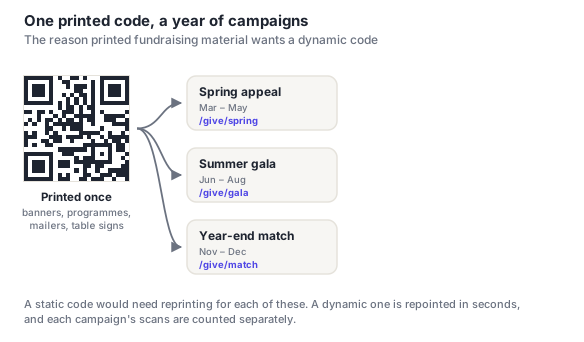
Dynamic codes also give you something packaging almost never provides: evidence that the pack was engaged with at all. Scan counts by week tell you whether a new front-of-pack code did anything, which is otherwise unmeasurable without commissioning research.
Say what's behind it
Packaging is a competitive surface and a code with no label loses to everything else on the pack. Four words is usually enough:
- "Scan for setup video"
- "Scan to reorder"
- "Where your coffee comes from"
- "How to recycle this"
- "Register for 3-year warranty": states a benefit, which is why registration codes with this label outperform ones marked "product registration"
Frequently asked questions
What should a QR code on packaging link to?
Something specific enough to name in four words. The destinations that get real use are setup and how-to videos, reordering pages for consumables, warranty registration, full ingredient or materials detail, provenance stories, and recycling instructions. A homepage is the common default and the least effective. It asks for effort with no stated reward, and rarely contains what the person holding the box wanted.
Where should a QR code go on a product package?
Depends who it's for. A code aimed at shoppers needs to be visible on shelf, so front or side. A code aimed at owners: setup, reordering, warranty: does better on the base, inside the lid or on an insert, where it's found at the moment of use. In all cases keep it off seams, folds and high-wear corners, give it a full four-module quiet zone, and don't place it right next to the retail barcode.
Should packaging QR codes be static or dynamic?
Dynamic, more so than for any other printed material. Packaging artwork is approved months ahead, and the product may sit in circulation for years, during which your site will be restructured and URLs will change. A static code becomes a dead link on a product you cannot recall. A dynamic one is repointed in seconds, and gives you scan data that packaging otherwise never provides.
Do shoppers actually scan QR codes on packaging?
Less than most brands hope, when the code is aimed at pre-purchase browsing. A shopper comparing two products in an aisle is in a hurry and rarely stops to scan. Post-purchase codes do much better: someone who has just opened a box and needs to set the thing up is highly motivated and will scan a code promising the setup video. If you want usage rather than a tick in a box, aim at the owner rather than the shopper.
Can a QR code replace the printed instruction leaflet?
Partly, and carefully. A video linked from the pack is genuinely better than a folded leaflet for most setup tasks, and it can be improved after the product ships. But it excludes anyone without a smartphone or connection at the moment of setup, and some product categories have legal requirements about supplied documentation. Treat the code as the better route rather than the only one, and keep a minimal printed fallback.