QR Code Basics
Types of QR Codes
"Type of QR code" is really two separate questions wearing one name: what the code does when scanned (static or dynamic), and what content it carries (a link, a contact card, Wi-Fi credentials, and so on). They're independent choices, and getting either wrong is expensive in different ways. One costs you a reprint, the other costs you a scan that lands somewhere useless.
The short version
- Static encodes the final data permanently; dynamic encodes a short redirect you can repoint later.
- Static is the right default for self-contained data (Wi-Fi, vCard, plain text) that has no reason to change.
- Dynamic is worth it for anything printed at volume, campaign-linked, or where you want scan analytics.
- Content type is a formatting convention, not a technical mode: every code stores plain text underneath.
- A content type only works if the scanning device has an app that understands it. Which is why Wi-Fi and vCard behave differently across platforms.
Static vs. dynamic QR codes
This is the most consequential decision you make, because it can't be changed afterwards without generating and reprinting a new code.
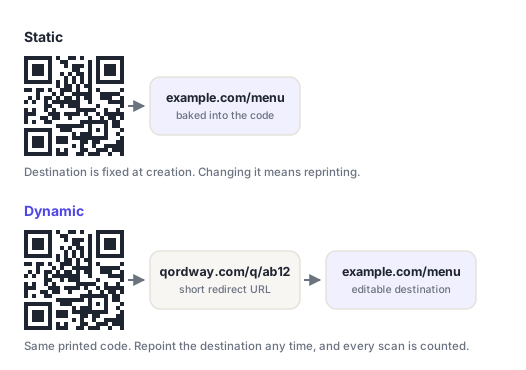
Static codes
A static code encodes its final data directly into the module pattern at creation time. Scanning it touches no external server. The data comes straight off the code. That makes static codes simple, free to generate indefinitely, permanent, and functional with no internet connection at all for self-contained payloads like Wi-Fi credentials, a contact card, or plain text.
The trade-off is absolute: if the destination changes, or you spot a typo after the code is on 5,000 flyers, there is no fix. You reprint. A static code also grows with its payload, so a long URL with tracking parameters attached produces a dense, harder-to-scan grid.
Dynamic codes
A dynamic code encodes a short redirect URL pointing at a service that forwards the scanner to the real destination. Because the target lives on a server rather than in the code, you can change it whenever you like, same printed code, new destination. Every scan passing through the redirect also makes analytics possible: counts, timestamps, device type, rough location.
The costs are real too. A dynamic code depends on the redirect service staying online for as long as the printed material exists, it normally requires an account with whoever generated it, and there's a small extra hop before the destination loads. Some free tools deliberately expire dynamic codes after a trial, check before printing anything.
| Static | Dynamic | |
|---|---|---|
| Editable after printing | No | Yes |
| Scan analytics | None | Yes |
| Works offline | Yes (for self-contained payloads) | No |
| Third-party dependency | None | Redirect service, indefinitely |
| Code density | Grows with payload | Always compact |
| Typical cost | Free | Usually account-gated |
| Best for | Wi-Fi, vCard, text, permanent links | Campaigns, packaging, signage, print runs |
Static for anything permanent and self-contained. Dynamic for anything printed at scale, anything tied to a campaign that might change, or anywhere you actually want the scan data. If the cost of being wrong is a reprint, go dynamic.
How the dynamic redirect actually works, and what it costs you →
Content types and their payload formats
Separately from static/dynamic, a code can carry several categories of content. It's worth being clear about what's actually happening here: a QR code has no concept of "type." It stores text. What makes a scanned code offer to join a Wi-Fi network rather than open a browser is that the text follows a formatting convention the scanning app recognizes. Those conventions are what this section documents.
Each of these has its own generator, already set to that type: URL, text, vCard, Wi-Fi, email, phone, SMS, WhatsApp, location and calendar event.
URL
The most common type by a wide margin. The payload is just the address, including the scheme:
https://example.com/menuAlways include https://. Without a scheme, many scanners treat the text as a plain string and show it rather than offering to open it. One density trick worth knowing: alphanumeric encoding mode covers uppercase letters only, so writing the host in uppercase, HTTPS://EXAMPLE.COM/menu, can drop the code a whole version smaller. Domains are case-insensitive, so it resolves identically; the path after the host is not case-insensitive, so leave that alone.
Plain text
No prefix at all. The scanner simply displays what's encoded. Used for serial numbers, short instructions, verification codes, or anything a human is meant to read rather than act on.
Asset 4417-B · Serviced 2026-03-11vCard / contact card
Encodes a structured contact record so scanning offers to save it straight to the address book. The widely-supported version is vCard 3.0:
BEGIN:VCARD
VERSION:3.0
N:Rivera;Sam;;;
FN:Sam Rivera
ORG:Northwind Studio
TITLE:Creative Director
TEL;TYPE=CELL:+15551234567
EMAIL:sam@example.com
URL:https://example.com
END:VCARD
vCards get long fast, and length drives code density. A full record with address and multiple numbers can push a code past version 10 and make it noticeably harder to scan from a business card. The compact alternative is MeCard, which Android handles well but iOS support for is patchier:
MECARD:N:Rivera,Sam;TEL:+15551234567;EMAIL:sam@example.com;;Wi-Fi credentials
Lets a phone join a network straight from the camera, with no typing. The format encodes the security type, network name and password:
WIFI:T:WPA;S:Guest Network;P:hunter2paperclip;H:false;;T is WPA, WEP or nopass; S is the SSID; P is the password; H marks a hidden network. Note the two semicolons at the end — that's not a typo, it's part of the format. If your SSID or password contains \, ;, ,, : or ", each must be escaped with a backslash.
A Wi-Fi QR code contains your password in plain text. Anyone who photographs the code has the password permanently, and changing it means reprinting. It's excellent for a guest network and a poor idea for the network your business systems run on.
A mailto: link, optionally with a subject and body pre-filled, opening the default mail client with a draft ready:
mailto:hello@example.com?subject=Menu%20feedback&body=Hi%20there%2CSubject and body must be URL-encoded, spaces become %20, line breaks %0A. Keep them short; a long pre-filled body inflates the code substantially for something the recipient will probably rewrite anyway.
Phone number
Opens the dialler with the number loaded. It does not place the call. Every platform requires a confirming tap, which is by design.
tel:+15551234567Always use full international format with the + and country code. A locally-formatted number fails for anyone scanning from a different country, which is exactly the audience a printed code tends to reach.
SMS
Opens the messaging app with recipient and optional message text pre-filled:
SMSTO:+15551234567:Send me the brochureSupport for the pre-filled body varies more than any other type here, some Android messaging apps ignore it and populate only the recipient. If the message text is essential, test on real devices before committing to print.
Technically a URL, using WhatsApp's own deep-link host, which opens a chat with a specific number and an optional pre-written message:
https://wa.me/15551234567?text=Hi%2C%20I%27d%20like%20a%20quoteThe number takes no +, no spaces and no dashes, just country code and number. This works whether or not the scanner has WhatsApp installed; without it they get a web prompt to install.
Location
Uses the geo: URI scheme, opening the default maps app at those coordinates:
geo:37.7749,-122.4194Android handles geo: natively. iOS is inconsistent with it, so if your audience is iPhone-heavy, a plain maps URL is the more reliable choice, less elegant, but it works everywhere.
Calendar event
An iCalendar VEVENT block, so scanning offers to add the event directly:
BEGIN:VEVENT
SUMMARY:Autumn product launch
DTSTART:20260901T180000Z
DTEND:20260901T200000Z
LOCATION:14 Wharf Road, Bristol
END:VEVENT
Times ending in Z are UTC. Get this wrong and you'll send every attendee a calendar entry at the wrong hour. A mistake that's invisible on the code itself and only surfaces once people start arriving early.
Choosing a content type
| If you want to… | Use | Static or dynamic? |
|---|---|---|
| Send people to a page | URL | Dynamic if it's printed at volume |
| Hand out your contact details | vCard | Static (it's self-contained) |
| Get guests onto Wi-Fi | Wi-Fi | Static (must work without internet) |
| Take restaurant orders | URL | Dynamic (menus change) |
| Collect inquiries | Email, SMS or WhatsApp | Static |
| Get people to an address | Location, or a maps URL | Static |
| Drive event sign-ups | URL | Dynamic (reuse the code next year) |
| Label physical stock | Plain text | Static |
Each of these types has a step-by-step guide in our product documentation, see QR code types in the help section for how to build each one on this site.
Frequently asked questions
Can I change a static QR code into a dynamic one later?
No. The distinction is baked into what the code encodes, a static code contains your destination, a dynamic one contains a redirect URL. So switching means generating a different code and replacing whatever the old one was printed on. If there's any realistic chance you'll want to redirect it later, choose dynamic at the start; the cost of an unused capability is far lower than the cost of a reprint.
Can one QR code do two things at once?
Not reliably. A code carries a single payload, and scanners act on the first convention they recognize. If you need one code to offer several actions: save a contact, follow a social account, open a site, point it at a landing page that presents those options. That also has the advantage of being editable, and of working identically on every device rather than depending on which apps are installed.
Why does my Wi-Fi QR code work on Android but not iPhone?
Usually a formatting detail. Check that the security type matches exactly (WPA covers WPA2 and WPA3; use nopass for open networks), that both closing semicolons are present, and that any special characters in the SSID or password are backslash-escaped. Networks whose name contains a space or an apostrophe are the most frequent culprit. Both platforms have supported Wi-Fi codes for years, so a genuine platform gap is unlikely.
Does the content type change how the code is encoded?
Only indirectly. Every type is stored as text, so the encoder just sees a string. But the string's character set and length determine which encoding mode is chosen and how large the grid becomes. That's why a vCard produces a much denser code than a short link: it's several hundred characters of mixed-case text, which forces byte mode and a high version number.