Use Cases
QR Codes for Business Cards & Networking
A QR code on a business card solves something real: typing a name, title, phone number and email into a phone at a conference is tedious enough that most people don't, and the card ends up in a drawer. But business cards are also the hardest place to put a QR code. The space is tiny, and the obvious choice of payload produces a code too dense to scan at that size.
The short version
- A full vCard often won't scan at business-card size. It's several hundred characters, which forces a dense grid.
- A short link to a contact page usually scans better and can be updated when you change jobs.
- 2–2.5 cm minimum, including the quiet zone.
- Keep it out of the corner: cards get trimmed, and trim tolerance eats finder patterns.
- Say what it does. "Save my details" beats an unexplained square.
- Keep the printed details too. The code supplements the card; it doesn't replace it.
vCard or link? The real trade-off
This is the decision that determines whether the code works at all, and the intuitive answer is often the wrong one.
| Embedded vCard | Link to a contact page | |
|---|---|---|
| Works offline | Yes | No |
| Saves contact in one tap | Yes | Usually two |
| Code density | High (often version 10+) | Low — version 2–3 |
| Scans at 2 cm | Frequently not | Comfortably |
| Updatable after printing | No | Yes, if dynamic |
| Tells you it was scanned | No | Yes |
| Can carry a photo, links, bio | Barely | Yes |
The density row is the one that decides it in practice. A vCard with name, title, company, mobile, office number, email, website and address runs to 300–400 characters, which produces a version 13 or higher code, roughly 70 modules across. Printed at 2 cm that's about 0.28 mm per module, comfortably below the 0.4 mm print floor, and it will scan unreliably or not at all.
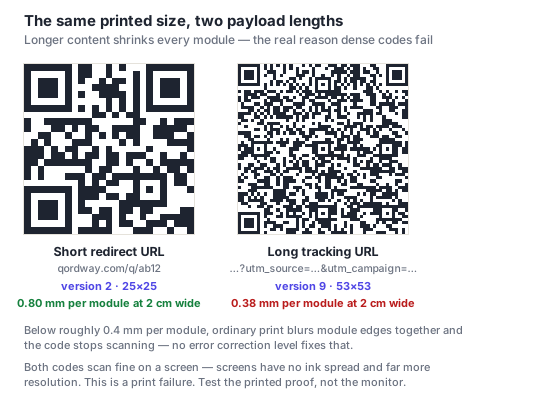
If you want an embedded vCard, keep it minimal: name, one phone number, one email, company. Drop the address, the second number, the fax line nobody has used since 2009. That gets you to roughly 120 characters and a code that scans at card size.
Otherwise, link to a contact page. It keeps the code sparse, survives a job change, can include a photo and links, and tells you when someone scanned it.
Size and placement on the card
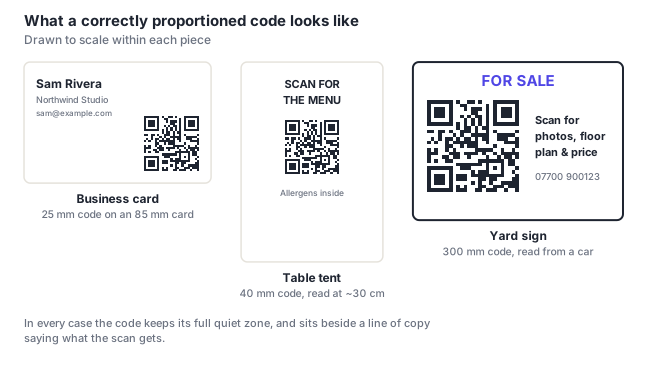
- 2–2.5 cm square including the quiet zone. On a standard 85×55 mm card that's roughly a quarter of the height — noticeable but not dominant.
- Keep it away from the trimmed edge. Card trimming has a tolerance of a millimeter or two, and a trim that clips a corner finder pattern kills the code outright. Leave at least 4 mm of clear card beyond the quiet zone.
- The back is usually the right place. It keeps the front clean and gives the code room.
- Matte, not gloss. A spot UV or gloss laminate over a code turns it into a mirror under the overhead lighting of every conference venue there has ever been.
- Black on white. Cards are small and the code is already at its size limit; this is the wrong place to spend contrast on brand color.
The copy next to it
An unexplained square on a card gets ignored, or scanned warily. Two or three words fix it: "Save my details," "Scan to connect," "My work & contact."
Keep the printed details as well. People photograph cards, read them on trains, and file them without ever scanning anything. And a card whose contact details are only reachable by scanning is worse than a normal card for a meaningful share of the people you hand it to.
What to put on the landing page
If you go the link route, the page should do in one screen what the card can't:
- A "save contact" button that downloads a vCard. You keep the one-tap save without the density cost.
- Tap-to-call and tap-to-email rather than text someone has to copy.
- Your LinkedIn or portfolio, whichever actually matters in your field.
- A photo. At a conference where someone collected fifteen cards, a face is what makes yours memorable.
- Nothing that requires a login, and no interstitial.
Use a dynamic code so the destination survives a change of role, phone number or employer. A box of 500 cards outlives a lot of job titles.
Before you order 500 of them
Business cards are ordered in quantities that make mistakes expensive and unfixable. The pre-print checklist applies, with two additions specific to cards:
- Get a physical proof and scan it, on more than one phone. A card-size code is close enough to its limits that "it scanned on my phone" is not evidence.
- Check the proof's trim. Confirm the code sits well inside the trimmed area on the actual printed card, not just in your artwork.
Frequently asked questions
Should a business card QR code use a vCard or a link?
A link, in most cases. A full vCard with address and multiple numbers runs to 300–400 characters, producing a code around 70 modules across that falls below the 0.4 mm print floor at business-card size and scans unreliably. A short link stays sparse, survives a job change, can carry a photo and links, and tells you when it was scanned. If you do want an embedded vCard, strip it to name, one number, one email and company.
How big should a QR code be on a business card?
2 to 2.5 cm square including the quiet zone, which is about a quarter of the height of a standard 85×55 mm card. Keep at least 4 mm of clear card beyond the quiet zone as well, trimming has a tolerance of a millimeter or two, and a trim that clips one of the corner finder patterns destroys the code completely.
Why won't my business card QR code scan?
Nearly always because the payload is too long for the size. An embedded vCard produces a dense grid, and at 2 cm each module falls below what print can reproduce, so module edges blur together. Shorten the payload, either trim the vCard fields or switch to a link. The other two common causes are a gloss laminate creating glare, and a trim that clipped a corner.
Where should the QR code go on the card?
Usually the back, which keeps the front clean and gives the code room to be a usable size. Wherever it goes, keep it clear of the trimmed edge and don't let text or rules encroach on its four-module quiet zone. Pair it with two or three words, "save my details", because an unexplained square on a card mostly gets ignored.
Do people actually scan QR codes on business cards?
Some do, particularly at events where they're collecting several cards and don't want to type. Many don't. They photograph the card, or file it, or read it later. That's the argument for keeping the printed details rather than treating the code as a replacement. A dynamic code answers the question directly for your own cards, since you'll see whether the scans happen at all.