QR Code Basics
How QR Codes Work
QR ("Quick Response") codes were developed in 1994 by Masahiro Hara at Denso Wave, a Toyota Group parts supplier, to track automotive components through manufacturing faster than the linear barcodes of the day allowed. The two-dimensional design was the breakthrough: a linear barcode encodes along one axis only, while a QR code encodes across both, letting it hold roughly 100 times more data in the same physical footprint. This page walks the whole structure, from the landmarks a scanner looks for down to the mask that gets applied last.
The short version
- Fixed structural regions (finders, timing, alignment, format info) are reserved before any of your data is placed.
- Four encoding modes pack characters at different densities; the encoder picks the cheapest one that fits your content.
- There are 40 versions (grid sizes), from 21×21 up to 177×177 modules.
- A mask is XORed over the data at the end to break up large blank or solid patches that would confuse a scanner.
- The scanner reads format information first. It can't decode anything until it knows which mask and correction level were used.
The anatomy of a QR code
Every QR code is built from a grid of dark and light squares called modules. Their arrangement isn't arbitrary: several fixed structural elements are placed first, and only the leftover space carries your content. Here is a real, scannable version 3 code with each region highlighted.
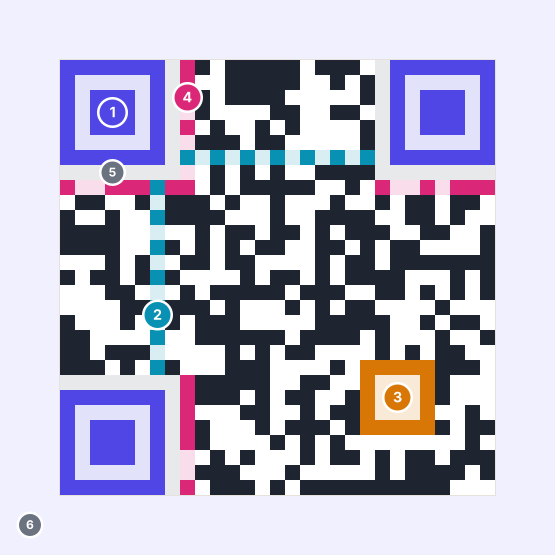
- 1Finder patterns Three identical nested squares at top-left, top-right and bottom-left. The scanner locates these before anything else.
- 2Timing patterns A single alternating dark/light row and column bridging the finders, establishing exact module width.
- 3Alignment pattern A 5×5 marker used to undo perspective distortion. Present from version 2 up.
- 4Format information 15 bits recording the error correction level and mask pattern, written twice, in two places.
- 5Separators A one-module blank border isolating each finder pattern from adjacent data.
- 6Quiet zone At least four modules of blank margin around the whole code. Required by the specification.
Finder patterns and the 1:1:3:1:1 ratio
The three corner squares are the reason a QR code can be read upside down, rotated, or held at an angle. Draw a straight line through the center of one in any direction and the run lengths of dark and light modules you cross always come out in the same proportion: 1:1:3:1:1.
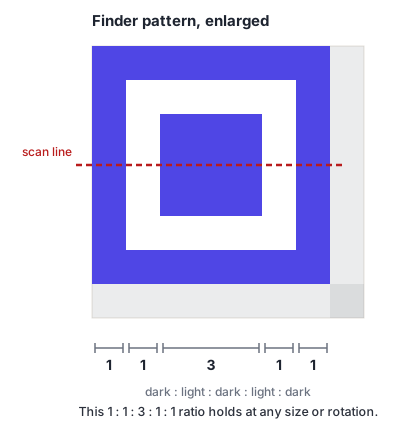
Because the ratio holds regardless of size or rotation, a scanner can sweep an image looking for that signature without knowing in advance how big the code is or which way up it sits. Finding three of them establishes the code's boundary and orientation in one step, three corners define the fourth. This is also why the corners are structural rather than data: damage there isn't something error correction can repair, because the scanner never gets far enough to apply it.
Alignment and timing
Three corners are enough to locate a flat, undistorted code. Real codes are rarely either. Alignment patterns, smaller 5×5 markers scattered through the grid from version 2 onward, give the scanner extra known reference points, so it can work out how the image is warped and correct for it. A code printed around a curved bottle, or photographed from below, is readable because of these.
Timing patterns solve a different problem. Once the scanner knows where the code is, it needs to know exactly how wide one module is so it can sample the right pixels. The alternating single-module line running between the finders gives it a ruler, which matters most at low resolution where a half-module error would misread the entire grid.
Format and version information
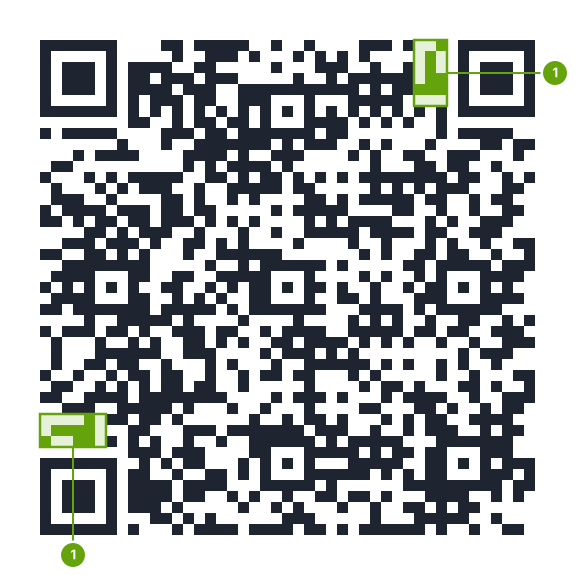
The format information strip beside the finder patterns carries 15 bits: 5 bits of actual content (error correction level plus mask pattern) protected by 10 bits of BCH error correction. It's written twice, in two separate places, because a scanner that can't read it can't read anything else. That redundancy is deliberate insurance on the most load-bearing 15 bits in the code.
From version 7 up, codes also carry two 18-bit version information blocks stating the grid size explicitly rather than making the scanner infer it by counting modules.
Encoding modes
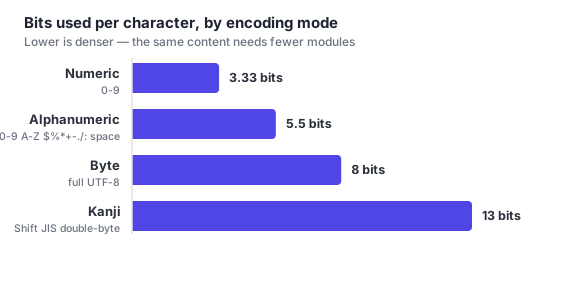
A QR code doesn't store all text the same way. The encoder inspects your content and picks a mode suited to its character set, because each mode packs data at a different density.
| Mode | Character set | Cost | Max at V40-L |
|---|---|---|---|
| Numeric | Digits 0–9 only | 3.33 bits/char | 7,089 digits |
| Alphanumeric | 0–9, A–Z uppercase, space, $ % * + - . / : | 5.5 bits/char | 4,296 chars |
| Byte | Raw 8-bit values: full UTF-8, lowercase, punctuation, most URLs | 8 bits/char | 2,953 bytes |
| Kanji | Double-byte Shift JIS characters | 13 bits/char | 1,817 chars |
Alphanumeric mode's uppercase-only restriction has a practical consequence people rediscover constantly: HTTPS://EXAMPLE.COM/MENU encodes in alphanumeric mode at 5.5 bits per character, while https://example.com/menu forces byte mode at 8. Since domain names are case-insensitive, writing the host portion in uppercase can shrink a code by a whole version. It looks odd to a human reading the URL, but it scans identically and produces a visibly simpler grid.
Encoders can also mix modes inside one code, numeric mode for a long digit run, byte mode for the rest, switching between them with short mode indicators to minimize the total.
Versions and capacity
"Version" refers to grid size, not a revision number. There are 40, from version 1 at 21×21 modules to version 40 at 177×177, each adding four modules per side. A generator selects the smallest version that fits your data at your chosen error correction level. Which is why the same URL can produce a visibly different code depending on that setting alone.
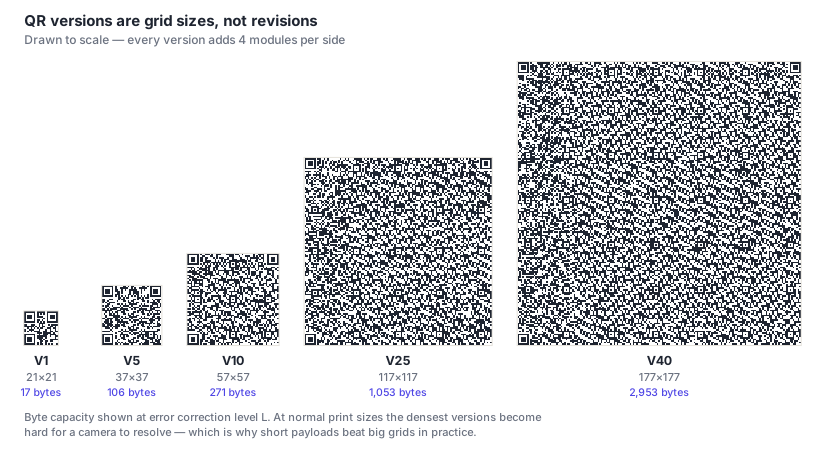
At the low end, version 1 at level L holds about 41 digits or 17 bytes. At the top end, version 40 at level L holds 7,089 digits or 2,953 bytes. In practice the upper half of that range is unusable for anything printed: each module shrinks as the version grows, and past a certain density a phone camera can't resolve individual modules at a sane print size. Shortening the payload beats increasing the version every time.
Masking: the step nobody expects
Here's the part that surprises people who assume a QR code is a straight rendering of their data. After the data and error correction bits are laid into the grid, the encoder applies a mask. It flips modules according to a formula, across the data area only, leaving the structural regions untouched.
The reason is that some data produces genuinely bad-looking grids. A long run of identical bytes can yield a large solid block or a wide blank patch, and either can defeat a scanner: a blank region can be mistaken for a quiet zone, and a pattern that accidentally resembles a finder pattern can send the scanner hunting in the wrong place entirely.
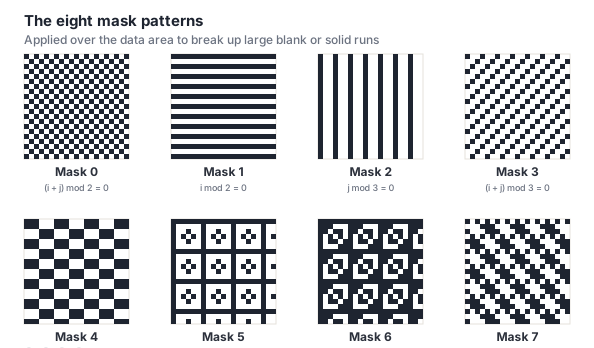
The specification defines exactly eight mask patterns. The encoder tries all eight, scores each result with a standard penalty function: punishing long same-color runs, 2×2 blocks of one color, patterns resembling finder patterns, and a dark/light imbalance far from 50/50. And keeps the lowest-scoring one. Which mask it chose gets recorded in the format information so the scanner can reverse it.
Masking is why encoding the same text twice can produce two visually different codes, and why a one-character change to your URL can rearrange the entire pattern rather than just a corner of it. Both codes are equally valid. If you've ever regenerated a code and been startled that it looks completely different, this is the reason.
Putting it together: how a scanner decodes
All of the above is designed around one sequence, which every conforming scanner follows in order.
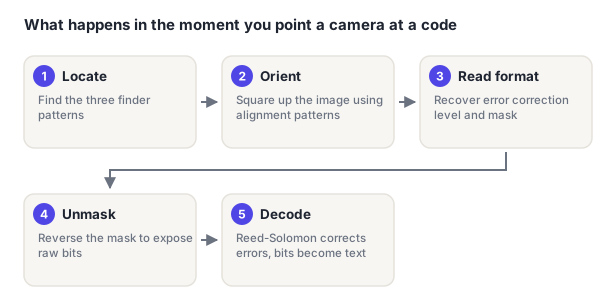
- Locate. Sweep the frame for the 1:1:3:1:1 signature. Three hits define the code's position, size and rotation.
- Orient and normalize. Use alignment patterns and the timing rows to build a transform that maps the distorted camera image back to a clean square grid, then sample each module.
- Read format information. Recover the error correction level and mask number from the 15-bit strip beside the finders, falling back to its duplicate if the first copy is damaged.
- Unmask. Apply the recorded mask again, XOR is its own inverse, to expose the raw bit stream.
- Decode. De-interleave the data and error correction blocks, run Reed-Solomon correction to repair anything unreadable, then read the mode indicators and character counts to turn bits back into text.
Steps 1 and 2 explain most real-world scan failures, because they happen before error correction is available to help. A missing quiet zone, an obscured corner, or a code with too little contrast fails at step 1. And no correction level can rescue it, because the scanner never reached the data.
Frequently asked questions
Why do two QR codes for the same link look completely different?
Almost always the mask. The encoder tests all eight mask patterns and keeps whichever scores best, and a small change in your data can tip that scoring to a different winner, rearranging the whole grid rather than one region. A different error correction level or a different generator's version-selection choices will do the same. All the resulting codes decode to identical text.
Can I read a QR code by eye?
In principle yes, in practice no. You'd need to identify the mask from the format strip, XOR it back out by hand, de-interleave the data blocks, and then decode the mode indicators, all before dealing with the Reed-Solomon symbols. People have done it as an exercise. It takes a long time and is not a security property you should rely on either way: a QR code is not encryption, and anything you put in one is readable by anyone who scans it.
What is a Micro QR code?
A smaller variant defined in the same standard, ranging from 11×11 to 17×17 modules across four versions (M1–M4). It uses a single finder pattern instead of three and needs only a two-module quiet zone, which makes it far more compact: at the cost of capacity, topping out at 35 numeric characters, and much narrower scanner support. It's used mainly on small electronic components where a standard code physically won't fit.
Does the color of a QR code affect how it works?
Not at the encoding level. The grid is identical regardless of color. It affects readability, though. Scanners depend on a sharp brightness difference between dark and light modules, so keep the dark modules genuinely dark and the background genuinely light. Inverted codes (light on dark) are valid per the specification but scan less reliably, because most scanner software is tuned to expect dark-on-light. See our design best practices for the details.