Design & Best Practices
Print vs. Digital QR Code Sizing Guide
The right size for a QR code isn't the size that looks proportional in your layout. It's a function of how far away someone will be standing when they scan it, and underneath that, of whether the camera can resolve one individual module. Get either wrong and the code fails, sized to the space available is the single most common way that happens.
The short version
- Minimum printed width ≈ scanning distance ÷ 10. Add 25% headroom on top.
- Never print modules below 0.4 mm. This is the constraint the distance rule is standing in for.
- The quiet zone counts. Four blank modules per side comes out of your layout budget, not from nowhere.
- Export vector (SVG/PDF/EPS) for print, or 300 DPI+ raster at final size.
- On screen, aim for 4+ device pixels per module and at least 150–200 px overall.
- Shortening the payload beats sizing up, because it reduces the module count you're dividing by.
This page is about physical dimensions: millimeters, pixels, DPI. If you want the module grid instead. How many modules a code has, how much data fits, what the 40 versions mean. That's QR code sizes and versions in the Basics section.
The 10:1 distance rule
The working guideline across the industry is that a code's printed width should be about one tenth of the distance it will be scanned from.
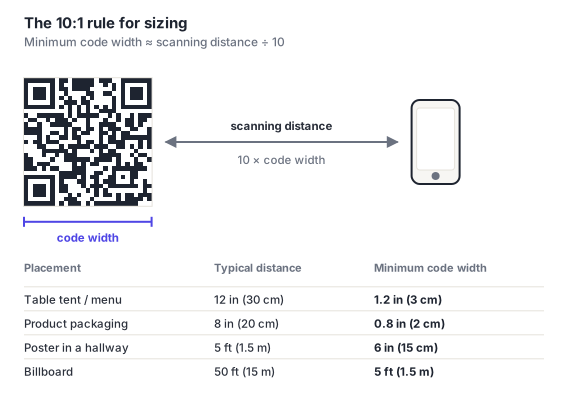
It's a rule of thumb rather than a physical law: camera quality, lighting and code density all shift the true minimum. But it's reliable as a starting point, and it fails safe in the direction that matters: codes sized by this rule are rarely too small, and oversizing a code costs you nothing but space.
Work it in whichever direction you have information for. If you know the distance, divide by ten. If you know the space, multiply by ten and ask whether people will really be that close.
Sizing by medium
Distances here are realistic scanning positions, not the closest someone could theoretically get. The recommended column adds roughly 25% headroom, which is worth taking.
| Placement | Distance | Minimum | Recommended |
|---|---|---|---|
| Business card | 20 cm (8 in) | 2 cm (0.8 in) | 2.5 cm (1 in) |
| Product label / packaging | 20 cm (8 in) | 2 cm (0.8 in) | 2.5 cm (1 in) |
| Receipt / ticket | 25 cm (10 in) | 2.5 cm (1 in) | 3 cm (1.2 in) |
| Restaurant table tent / menu | 30 cm (12 in) | 3 cm (1.2 in) | 4 cm (1.6 in) |
| Flyer / A4 poster on a desk | 40 cm (16 in) | 4 cm (1.6 in) | 5 cm (2 in) |
| Retail shelf edge | 60 cm (2 ft) | 6 cm (2.4 in) | 8 cm (3 in) |
| Wall poster in a corridor | 1.5 m (5 ft) | 15 cm (6 in) | 20 cm (8 in) |
| Shop window | 2 m (6.5 ft) | 20 cm (8 in) | 25 cm (10 in) |
| Trade show banner | 3 m (10 ft) | 30 cm (12 in) | 40 cm (16 in) |
| Vehicle livery | 5 m (16 ft) | 50 cm (20 in) | 65 cm (26 in) |
| Billboard | 15 m (50 ft) | 1.5 m (5 ft) | 2 m (6.5 ft) |
A code readable at 50 m needs to be around 5 m across, and the person scanning has to be stationary. Which on a motorway they are not. Roadside QR codes fail for reasons no amount of sizing fixes. If the audience is moving, a short memorable URL does the job the code can't.
The real constraint: module size
The distance rule is a proxy. What actually determines whether a code scans is the size of one module, because that's what a camera has to resolve individually.
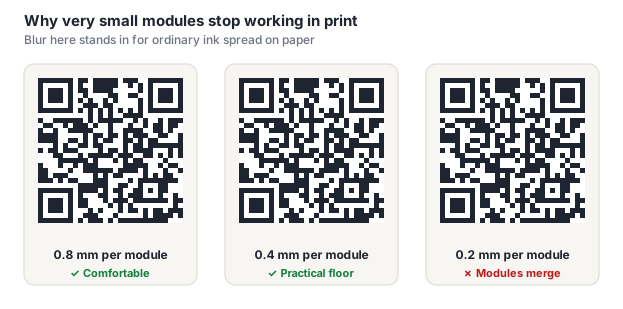
Keep printed modules at 0.4 mm or larger. Below that, ordinary ink spread starts merging adjacent modules and the pattern degrades into noise regardless of source-file quality.
Which gives you the actual formula:
minimum width = module count × 0.4 mm, where module count includes the eight quiet-zone modules.
| Version | Grid | With quiet zone | Absolute minimum width |
|---|---|---|---|
| 1 | 21×21 | 29 | 11.6 mm |
| 3 | 29×29 | 37 | 14.8 mm |
| 5 | 37×37 | 45 | 18 mm |
| 10 | 57×57 | 65 | 26 mm |
| 15 | 77×77 | 85 | 34 mm |
| 20 | 97×97 | 105 | 42 mm |
This is why shortening the payload beats sizing up. A shorter payload drops the version, which drops the module count, which drops the minimum width. The same physical space suddenly has room to spare.
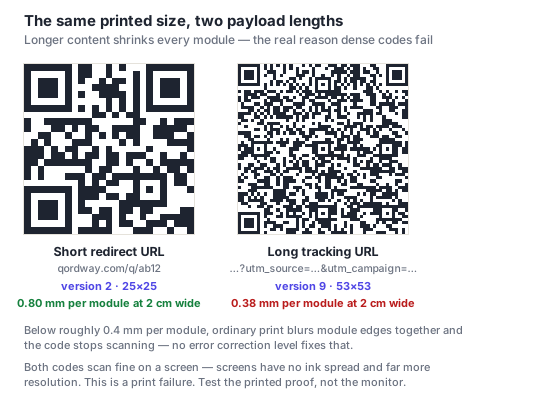
Difficult substrates need more margin still. Uncoated and kraft stock absorb ink and spread modules further, so increase module size 25–50%, see packaging and curved surfaces.
Resolution, DPI and export format
- Use vector wherever the process allows. SVG, PDF or EPS scale to any size with perfectly sharp module edges. For large-format especially, this is the whole answer.
- If you must use raster, export at 300 DPI or higher at final printed size. Not at some size and then scaled.
- Never scale a raster code up in your layout. A 300 DPI PNG enlarged 200% in InDesign is a 150 DPI code. This is a common workflow bug and it's invisible until it's printed.
- Avoid JPEG. Its compression puts artifacts exactly on the hard edges a code is made of. PNG or vector.
- Don't resample, rotate slightly, or apply effects to a code after export. Any resampling softens module boundaries.
Our download guide covers which formats the generator produces and when to use each.
On-screen sizing
Digital placement has no "distance" in the same sense, but it has its own floor, the device pixel.
- Aim for at least 4 device pixels per module. A version 10 code (57 modules) therefore wants 228 px minimum, plus the quiet zone.
- 150–200 px is a sensible overall minimum for a short payload on a web page meant to be scanned from a second device.
- Watch responsive layouts. A code that's fine on desktop can be squeezed below its floor at narrow viewports. Test at a real mobile width, and set a min-width so it can't shrink past usefulness.
- Never let a code render partially off-screen or inside a container that clips it. A partially visible code is an unscannable one.
- Use SVG on the web. It stays sharp on high-DPI displays where a raster code at nominal size looks soft.
- For slides and video, apply the print distance rule using the distance of the furthest audience member, not the person in the front row. And leave it on screen long enough for people to get their phones out. A code shown for three seconds may as well not be there.
Codes scanned off a monitor work fine, with two caveats worth telling users about: raise screen brightness, and tilt slightly so the screen's own reflection doesn't wash the code out. This matters for tickets and boarding passes displayed on a phone.
Don't forget the quiet zone
The four-module blank margin on each side is part of the code and comes out of your layout budget. On a version 3 code that's 8 extra modules across a 29-module grid, about 28% additional width.
Sizing a slot to the visible black area alone is one of the most common causes of an unscannable printed code, because the margin gets absorbed by whatever sits next to it. When space is tight, shrink the code, never the quiet zone.
Frequently asked questions
What size should a QR code be?
Roughly one tenth of the distance it will be scanned from, plus about 25% headroom. A code on a table tent read at 30 cm wants about 4 cm; a poster read across a corridor at 1.5 m wants about 20 cm. Underneath that rule, never let individual modules fall below 0.4 mm in print. That's the constraint the distance rule is standing in for, and it's what actually decides whether a camera can read the pattern.
What's the smallest a QR code can be?
About 2 cm (0.8 in) square including the quiet zone for a short payload scanned at arm's length. The hard floor is per-module rather than overall: at 0.4 mm per module, a version 3 code with its quiet zone needs 14.8 mm and a version 10 code needs 26 mm. If you need it smaller, shorten what's encoded so the code drops to a lower version. That's the only lever that actually reduces the minimum.
What DPI should a QR code be for printing?
300 DPI or higher, at the final printed size, or better, use a vector format (SVG, PDF, EPS) and sidestep resolution entirely. The common mistake isn't exporting too low, it's exporting at 300 DPI and then scaling the image up in a layout program, which halves the effective resolution at 200%. Avoid JPEG regardless of resolution, since its compression artifacts land on exactly the sharp edges a code depends on.
How big should a QR code be on a business card?
2 to 2.5 cm (0.8–1 in) square including its quiet zone, which fits comfortably on a standard card. The bigger risk is payload rather than dimensions: a full vCard is several hundred characters, which produces a high-version, very dense code that can't be printed legibly at that size. A short link to an online contact page scans far better and can be updated later.
Does a bigger QR code hold more data?
No, capacity is set by the module grid (the version), not by physical dimensions. Printing a version 2 code at billboard size still holds exactly 32 bytes. Physical size determines the distance it can be scanned from, which is a separate question from how much it holds. See sizes and versions for the capacity side.