Use Cases
QR Code Menus for Restaurants
Menu QR codes arrived as a contactless necessity in 2020 and stayed for a better reason: a menu you can change at 4pm without reprinting is genuinely useful. But they also earned a bad reputation, almost entirely from one avoidable decision, linking to a PDF. Getting this right is mostly about the destination, and secondarily about not making diners squint.
The short version
- Never link to a PDF. It's the single reason people hate QR menus.
- Use a dynamic code so prices, specials and seasons change without reprinting table tents.
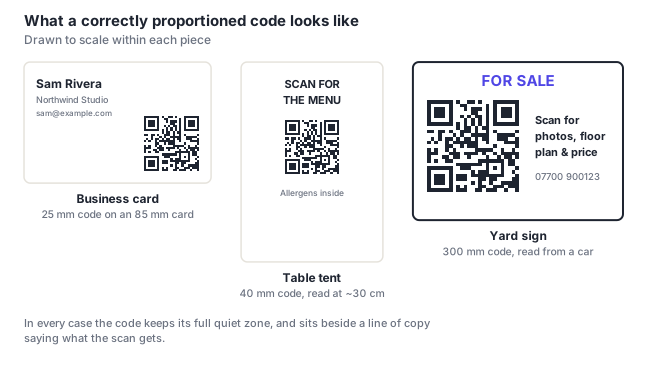
- 3–4 cm on a table tent, read at about 30 cm.
- Never make it the only menu. Keep printed copies available without anyone having to ask twice.
- Allergen information must be reachable: in many places that's a legal duty, not a nicety.
- Guest Wi-Fi matters: a menu nobody can load is worse than no code.
The PDF problem
Most bad QR menu experiences are the same experience: the code opens a PDF designed for A4 paper, the phone renders it at 20% zoom, and the diner spends the next minute pinching, dragging and losing their place. It is genuinely worse than a paper menu in every respect.
What to link to instead, in order of preference:
- A mobile web page: real HTML text that reflows to the screen. Fast, readable, searchable, accessible to screen readers, and easy to update.
- Your ordering platform's menu: if you use one, already mobile-designed, and it puts ordering one tap away.
- A hosted menu service, if building a page isn't practical. Check it produces real text rather than an image of a menu.
Open your menu link on a phone and try to read a price without zooming. If you can't, your diners can't. An image of a menu, a JPEG or a PDF export, fails this test no matter how good the design is, and it also excludes anyone using a screen reader.
Why the code should be dynamic
Table tents, window decals and menu holders are printed in bulk and expected to last. Everything behind them changes constantly: prices, seasonal dishes, the lunch menu that's different from dinner, the platform you host on.
A dynamic code means the printed material never has to change. It also gives you scan counts, which answer questions restaurants usually can't: how many people actually look at the menu before ordering, whether the window code brings anyone in, whether the specials insert gets read.
A practical pattern worth adopting: one code per placement. A different code on the table tent, the window, and the takeaway bag tells you which is doing the work.
Sizing and placement on the table
| Placement | Size | Notes |
|---|---|---|
| Table tent | 3–4 cm | Both faces, so it works from either side of the table |
| Table sticker / vinyl | 4–5 cm | Matte laminate (gloss reflects overhead lights) |
| Printed menu corner | 2.5–3 cm | For allergens or the full drinks list |
| Window decal | 8–12 cm | Read from the pavement (bigger than you think) |
| Takeaway bag / receipt | 2.5–3 cm | Good spot for reviews or reorder |
| A-board outside | 10–15 cm | Weatherproof, matte, high contrast |
Restaurant lighting is the constraint people forget. Dim, warm, often with candles, and frequently with a spotlight directly overhead that turns a glossy laminate into a mirror. Matte finish, black on white, generously sized beats an elegant tone-on-tone code every time. See QR code colors for why a subtle tint fails under low light.
Allergens, and the legal side
In the UK, EU and many other jurisdictions, allergen information for non-prepacked food must be available to customers. A QR menu can satisfy that. But only if the information is genuinely reachable, and only if there's a route for someone who can't or won't scan.
- Put allergen information on the menu page itself, not on a separate page two taps away.
- Keep a printed allergen reference behind the bar. Staff must be able to answer without a phone.
- Train staff to offer it rather than waiting to be asked.
- Update it with the same discipline as prices. A dynamic code makes this easy, which removes the usual excuse.
This is not legal advice and requirements vary by country. But the practical version is simple: if the only way to learn what's in a dish is to successfully scan a code, that's a problem worth fixing regardless of what the rules say where you are.
Accessibility, and never being the only menu
A QR-only menu excludes a real slice of your customers: people without a smartphone, people with a flat battery, people with low vision who find phone menus difficult, older diners, and anyone on a poor connection.
- Keep printed menus available, and make sure staff offer them rather than producing one grudgingly when asked twice.
- Make the digital menu real text, which makes it work with screen readers and text scaling, another reason PDFs and images fail.
- Put guest Wi-Fi details next to the code. A Wi-Fi QR code beside the menu code solves the "no signal in this basement" problem in one scan.
- Don't require an app. Nobody is installing something to read a menu.
- Don't demand an email address before showing the menu. It converts a menu into a lead-capture form and diners notice.
Frequently asked questions
How do I make a QR code menu for my restaurant?
Put your menu online as a mobile web page (real text, not a PDF or an image) then generate a dynamic QR code pointing at it. Print it at 3–4 cm on double-sided table tents with a line of copy saying "scan for our menu," using a matte finish and plain black on white. Test it on a phone in your actual dining room lighting, and keep printed menus available for anyone who'd rather have one.
Why do people hate QR code menus?
Almost entirely because of PDFs. A PDF designed for A4 renders on a phone at a zoom level where nothing is legible, so the diner spends a minute pinching and dragging instead of choosing food. The other common complaints (no signal, being forced to install an app, having to hand over an email address before seeing prices) are all avoidable too. A plain mobile web page with real text solves nearly all of it.
Can a QR code menu replace printed menus entirely?
It shouldn't. A QR-only menu excludes customers without a smartphone, with a flat battery, with low vision, or on a bad connection. And in many places allergen information has to be genuinely available to everyone. Keep printed copies and have staff offer them naturally. The code is there to make updating easy and to save paper, not to remove the fallback.
What size should a QR code be on a restaurant table?
3–4 cm on a table tent, which is sized for the roughly 30 cm a seated diner will be from it. Go to 4–5 cm for a table sticker, since people scan those at a slightly awkward angle. Use a matte finish rather than gloss, restaurant lighting is dim with bright overhead spots, which is exactly the combination that turns a glossy code into a mirror.
Should the menu code be static or dynamic?
Dynamic. Prices change, dishes change seasonally, lunch differs from dinner, and hosting platforms change, while the table tents stay on the tables. A dynamic code means none of that requires reprinting. It also counts scans, which tells you whether the window decal brings anyone in and how many diners actually open the menu before ordering.