Help
Dynamic QR Codes
A dynamic QR code encodes a short, permanent Qordway redirect link instead of your destination directly — so you can change where it points after it's already printed, without reprinting anything. Available on every plan, including the free Basic plan.
The short version
- The printed code contains
qordway.com/q/AbCd1234, not your real URL. - You can repoint that short link at any time; already-printed codes follow immediately.
- Because the encoded text is short, the code stays visually simple no matter how long the real destination is.
- Every scan is counted — see Dynamic QR Analytics.
- The redirect depends on this service continuing to run. A static code doesn't.
Creating one
Design any QR type on the generator as usual, then click Save as Dynamic QR instead of (or in addition to) the regular Save. You'll get a short link like qordway.com/q/AbCd1234 — that's what actually gets printed on the code, and it's what you'll see if you download it right after creating one.
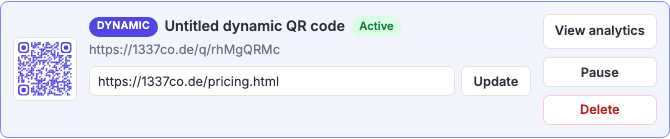
Download the code after saving it as dynamic, not before. A code downloaded beforehand still encodes the destination directly and won't be editable later — it's a static code that happens to look identical.
Editing, pausing, and deleting
From My Code Library, each dynamic code has its own editable destination field — change it and click Update, and every future scan of the already-printed code goes to the new destination immediately. There's no propagation delay and nothing to re-download.
Pause stops the code resolving: scanners get a page saying the code is no longer active, instead of being redirected. Resume puts it back. This is the control to reach for when a campaign ends, a page is broken, or something needs to come down quickly.
Delete removes the code from your library and stops it resolving, permanently. Three things worth knowing before you use it:
- It can't be undone. Anyone scanning the printed code afterward sees the same "no longer active" page a paused code shows — but you can't bring it back.
- The short link is never reissued. That code is retired for good, so a deleted code can't be resurrected by someone else and can't start pointing somewhere unexpected.
- Its scan history is kept, but you lose access to it. Export the analytics first if the numbers matter to you.
If what you actually want is for the code to stop working for a while, pause it. Delete is for codes you're certain are finished.
How many you can create
| Tier | Dynamic QR limit |
|---|---|
| Basic | 2, each capped at 500 scans |
| Advanced | 15, unlimited scans |
| Business | 200, unlimited scans (per person; shared team codes don't count against this — see Business Accounts) |
Deleting a code frees its slot. An Advanced account holding fifteen codes can delete one and immediately create another — but the deleted code's printed artwork is dead permanently, so this isn't a way to recycle a code that's still out in the world. Paused codes still occupy a slot, which is the right trade: the printed code still exists, so the slot reflects reality.
When a dynamic code is the right choice
Dynamic isn't automatically better — it's a trade. Use it when:
- The code is going somewhere you can't easily reprint — packaging, signage, vehicle livery, an engraved plate, a printed run of thousands.
- The destination is likely to change — a seasonal campaign, a menu, an event page that becomes an archive page.
- You need to know whether it's being scanned. A static code produces no data at all, by definition. This is the only way to measure.
- The real URL is long. A destination with tracking parameters produces a dense, fragile code; the short redirect keeps the grid coarse and the code robust at small sizes. See why dense codes fail.
Stay static when the destination genuinely can't change — a Wi-Fi network, a phone number, a vCard — or when you need the code to keep working with no dependency on any service, forever. A static code has no moving parts and no owner.
Frequently asked questions
Do I need to reprint anything after changing the destination?
No — that's the entire point. The printed code encodes the short redirect link, which never changes. Editing the destination changes where that link forwards to, and the next scan of the existing printed code goes to the new place. Nothing about the artwork changes.
What happens if I stop paying, or delete my account?
Be careful here, because it's the real cost of dynamic codes. The redirect only works while the code exists on this service. Deleting your account removes your dynamic codes, and anything printed with them stops resolving — permanently, since the short links are never reissued. For codes on something long-lived and expensive to replace, weigh that against a static code, which depends on nothing.
Can I change a static code into a dynamic one later?
Not for a code that's already printed — a static code has your destination baked into the printed pattern, so there's nothing to redirect. You can create a dynamic version in the generator and print that instead, but the artwork is different and anything already out in the world stays static.
Does the redirect slow down the scan?
Not perceptibly. The redirect is a single hop served from a CDN edge close to the person scanning, and it happens while their browser is already opening. In exchange the code itself is far less dense than one encoding a long URL, which usually makes it faster to scan in the first place — the camera locks on sooner.
Can two dynamic codes point at the same destination?
Yes, and it's often the right move. Giving each poster, flyer or location its own code costs you a slot but tells you which one people actually scanned — otherwise the numbers arrive merged and you can't tell what worked.
Is there a limit on how often I can change the destination?
No. Change it as often as you like; each change is recorded with a timestamp in the code's destination history, so you can see what it pointed at and when. That history is kept for 13 months.