Dynamic QR Codes
Dynamic QR Analytics
Every scan of a dynamic QR code is recorded — click "View analytics" next to any dynamic code in your library to see the breakdown.
What's tracked
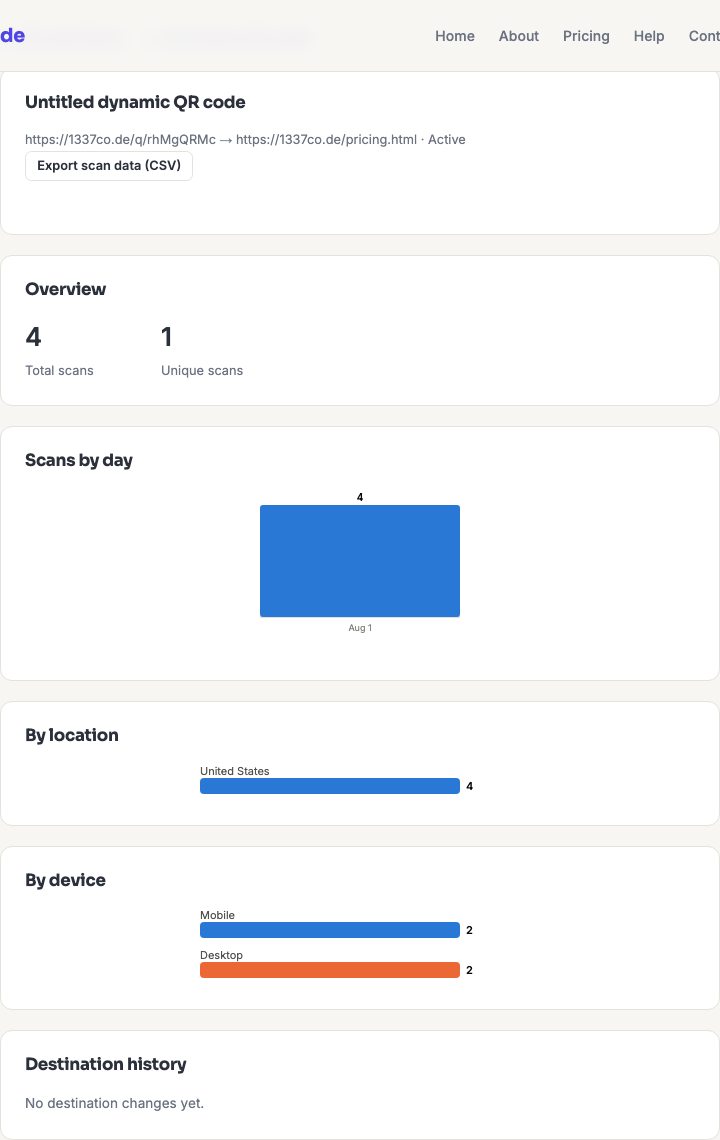
- Total and unique scans — unique is counted per day, from a salted hash rather than your visitors' IP addresses.
- Scans by day — a bar chart over time.
- By country — derived from the network the scan came from, not GPS.
- By device type, OS, and browser — mobile vs. desktop, plus the operating system and browser, parsed from the scanning device's user agent.
- Destination history — every time you've changed where the code points, with a timestamp and who changed it.
Region and city are recorded for each scan but aren't charted on this page — the on-screen location breakdown is by country. To see region and city, use the CSV export below.
Total vs. unique scans
These two numbers answer different questions, and the gap between them is usually the interesting part.
- Total scans counts every scan event, including the same person scanning repeatedly.
- Unique scans counts distinct visitors per day. Someone who scans your poster three times on Monday is one unique scan; if they scan it again on Tuesday, that's another one.
So unique scans is a per-day figure by design, not a lifetime count of individual people — the privacy design below makes a longer-lived identity impossible on purpose. A big gap between total and unique usually means either repeat engagement (a menu people come back to) or one device testing the code a lot, often yours.
Reading the numbers honestly
A few things that routinely mislead people:
- Your own testing is in the data. Every proof scan you did before printing is a scan. Early numbers on a new code are mostly you.
- Some scanners fetch the link without a human ever seeing it. Link previews, security scanners and messaging apps can all trigger the redirect. Treat small numbers with suspicion.
- A scan is not a visit. It records that the redirect was followed, not that anyone stayed, read anything, or converted. Pair this with your own site analytics if what you care about is what happened next — see tracking QR scans in Google Analytics.
- Country comes from the network, not the person. A VPN, a corporate network, or a mobile carrier routing through another city will all report accordingly.
- Zero scans doesn't always mean nobody tried. If a printed code fails to scan, that failure never reaches us — there's no event to record. Persistent zeroes on a code you know is deployed is a reason to go and test the physical artwork.
Exporting your data
Click Export scan data (CSV) on any code's analytics page to download the raw per-scan log for your own analysis. The file has one row per scan with these columns:
| Column | Contains |
|---|---|
scanned_at | Timestamp of the scan |
country, region, city | Approximate location from the network |
device_type | Mobile, desktop, or tablet |
os | Operating system |
browser | Browser |
There's no IP address column, because none is stored. The export is the only place region and city appear.
How long data is kept
Scan events and destination-change history are both retained for 395 days — 13 months, so a full year plus a month of overlap for year-on-year comparison. After that they expire automatically. Nothing needs to be cleaned up manually and there's no way to extend it, so export anything you need to keep longer.
Privacy
Qordway never stores a visitor's raw IP address. When someone scans a code, we compute a SHA-256 hash of a secret salt, their IP, and the current calendar date, and keep only the first 16 characters of that. The IP itself is never written down.
Because the date is part of what's hashed, the value changes every midnight. The same person scanning on two different days produces two unrelated hashes, so the data can count distinct visitors within a day and is structurally incapable of tracking anyone across days. That's a property of the design, not a policy we promise to honour.
Location comes from CloudFront's edge headers — a rough network-level lookup performed in transit, not a geolocation API call and not GPS. Nobody is asked for location permission and nothing precise is available to us.
See QR codes, privacy and GDPR for how this maps onto data-protection obligations.
Frequently asked questions
Why are my unique scans higher than the number of real people?
Because unique is counted per day. Someone who scans your code on three separate days counts once each day, so a code scanned regularly by the same small group accumulates more "unique" scans than there are people. It's a daily-reach figure, not a headcount.
Can I see who scanned my code?
No, and not by choice on your part — the system has no way to tell you. No IP addresses are stored, no accounts are involved on the scanning side, and the daily-rotating hash can't be linked back to a person or across days. You get counts and coarse breakdowns, and that's genuinely all that exists.
Do static QR codes get analytics too?
No, and they can't. A static code sends the person straight to your URL without ever touching us, so there's nothing to observe. Scan tracking is the main practical reason to choose a dynamic code.
The chart shows scans on a day I know nobody scanned it. Why?
Almost always an automated fetch: a messaging app generating a link preview, a security product checking the destination, or a crawler. These follow the redirect exactly like a person would, and there's no reliable way to tell them apart. It's why small numbers are worth treating as noise.
Can I add UTM parameters to see this in my own analytics?
Yes — put them on the destination URL. The redirect preserves the query string, so the parameters arrive at your site and show up in your own analytics as normal. Doing this on the destination rather than the printed code is exactly why dynamic codes suit tracked campaigns: you can change the tagging later without touching the artwork.