QR Code Types
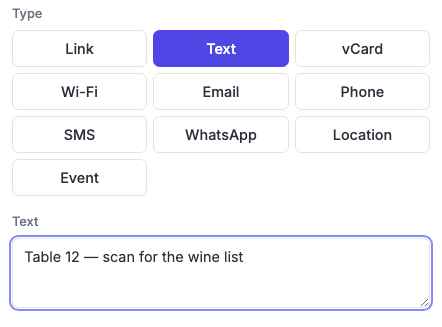
Text QR Codes
Encodes plain text with no action attached. Scanning it simply displays the message on the phone's screen — nothing opens, nothing is dialled, no network is needed.
How to create one
- Open the Text QR code generator — it opens on the Text type with the fields ready to fill in.
- Type or paste your message.
What it's actually good for
Because nothing happens beyond showing text, this type suits information that needs to be read rather than acted on — and that works with no signal at all.
- Equipment and asset labels — serial numbers, model numbers, service dates, calibration records.
- Instructions in the field — a short procedure on a machine, a valve, a breaker panel.
- Inventory and warehouse tags where a scanner app captures the value into a system.
- Anywhere there's no reception — a basement plant room, a remote site, inside a shipping container.
If you want someone to do something — visit a page, call, join Wi-Fi — use the type built for it. Those produce a tappable prompt; this produces text a person has to act on themselves.
Length is the main constraint
Every character is encoded directly, so text codes get dense fast. A sentence is fine; several paragraphs produce a grid too fine to scan at any reasonable printed size.
The hard ceiling is 1,273 bytes, and the generator blocks anything longer — but treat a couple of hundred characters as the practical limit for something being printed. If you have more to say, put it on a page and use a Link code.
Note that's bytes, not characters: accented letters, non-Latin scripts and emoji each take two to four bytes, so a message well under 1,273 characters can still be refused. See QR code capacity.
Frequently asked questions
Will scanning this open a browser?
No. That's the point of this type — the text is displayed and nothing else happens. Most phone cameras show it as a notification or an on-screen banner with an option to copy or share it.
Can I include a URL in the text?
You can, and most phones will make it tappable — but a Link code is more reliable and produces a cleaner prompt. Use text when the message is the point and any link is incidental.
Does line-break formatting survive?
Line breaks are encoded, but how they're displayed depends entirely on the scanning app — some collapse them. Don't rely on layout; keep the message readable as a single block.
Can I use emoji or non-English characters?
Yes, both are supported. Just be aware they consume the capacity budget several times faster than plain ASCII, so a code full of emoji becomes dense quickly.
Why does my text code look denser than a link to the same length?
It usually isn't — for the same number of characters the density is comparable. What catches people out is that URLs are short and messages tend to be long.