Your Account
Deleting Your Account
Account deletion is self-service, from your profile, and permanent.
How to delete your account
On My Profile, scroll to the "Delete account" panel, re-enter your current password to confirm, and submit.
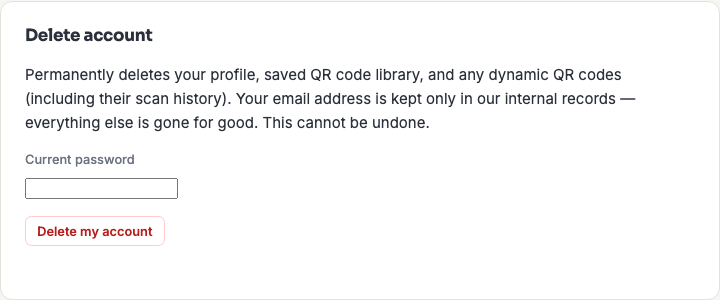
The password step is a genuine check against the authentication service, so an unattended open session can't be used to delete your account.
What gets deleted
Your profile, your saved QR code library, and any dynamic QR codes — including their scan history — are permanently deleted.
Your email address is kept in a minimal internal record afterwards. This is a deliberate choice rather than an oversight: it supports deduplication and remarketing. Nothing else about the account survives.
What happens to codes you've already printed
This is the part worth pausing on, because the two code types behave completely differently.
- Static codes keep working, forever. A static code carries its data in the printed pattern and never contacts us, so deleting your account has no effect on anything already printed or downloaded.
- Dynamic codes stop working, permanently. They depend on our redirect, so anything printed with one starts showing a "no longer active" page — and the short links are never reissued, so this can't be undone by signing up again.
If you have dynamic codes out in the world on packaging, signage or anything else you can't recall, deal with them before deleting. Export any analytics you want to keep first, too — see Dynamic QR Analytics.
Business team members
If you're part of a business team, deleting your account ends your access to that team's shared library immediately — your sign-in no longer exists, so there's nothing left to log in with. Codes you added to the shared library stay there: they belong to the business, not to you, and the team keeps working normally.
Your entry is taken off the team's roster automatically when the account is deleted, so the membership list stays accurate without anyone having to tidy up afterwards.
If you're the team's only Admin, deletion is refused until you promote someone else. A business always needs at least one Admin, and there's no way to appoint one from outside the team — so if the only Admin could delete themselves, nobody left could manage the business at all. Promote another member first and the deletion goes through normally. See Roles & Permissions.
This only applies when other people are still on the team. If you're the sole member of your business, there's nobody to hand over to and deletion proceeds as usual.
Frequently asked questions
Can I recover a deleted account?
No. There's no undo, no grace period, and no recovery process — deletion is immediate and final. Signing up again with the same email creates a genuinely new, empty account.
Is there a way to pause my account instead?
Not currently. If you simply don't want to be charged or don't plan to use it for a while, leaving the account alone costs nothing and keeps everything intact — deletion is only for when you actually want the data gone.
Do I need to download my QR codes first?
Only if you want to keep the designs. Codes you've already downloaded or printed are unaffected if they're static. What you lose is the saved library — the ability to reload a design and restyle or re-download it.
What happens to shared codes I created for my team?
They stay in the team's shared library. Codes in the shared library belong to the business, not to you, so they survive your account being deleted — which is the intended behaviour for work the team depends on.
How do I delete just my data but keep the account?
Delete individual items instead: remove saved codes from My Code Library and delete any dynamic codes you no longer want. That clears the content without ending the account.