Help
Saved QR Code Library
Every plan, including the free Basic plan, can save QR codes to your account and come back to them later without redoing the design.
Saving a code
While logged in, design a QR code on the generator, then click Save to library next to Download. It's stored with its full color and shape styling so you can reload and keep editing it later.
What's saved is the design, not an image file: the encoded value plus the styling options you chose. The thumbnail you see in the library is re-rendered in your browser from that data each time. Nothing is uploaded, and no image is stored on our side.
Your library
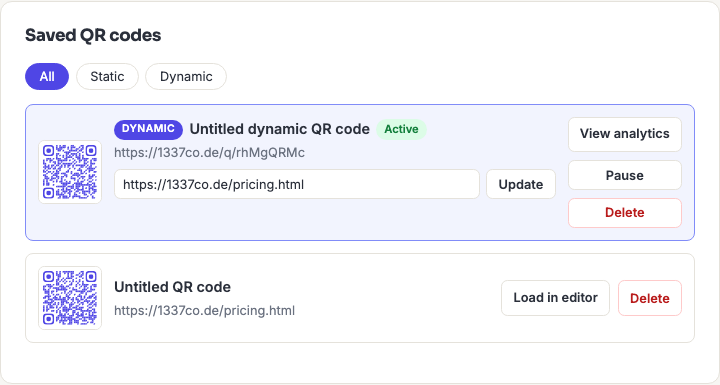
Open My Code Library from the account menu to see everything you've saved, each with a live thumbnail. From there you can:
- Load in editor — brings the code back into the generator with its styling intact, so you can keep customizing or re-download it in a different format or size.
- Delete — removes it from your library and frees a slot.
What gets preserved, and what doesn't
Everything you typed comes back. Loading a saved code restores the QR type and every field you filled in — a vCard returns with its name, phone, email and address boxes populated, a Wi-Fi code with its network name, password and security setting, an Event with its title, times and location. You can edit any single field and re-download without re-entering the rest.
Dot and background colours, dot style and corner style come back too.
Your styling comes back with the code. Colours, gradients, dot and corner styles, the circle shape, background roundness, and your frame and its text are all saved and restored when you load a code back into the editor.
The one exception is an embedded logo. Logo images never leave your browser — we don't upload or store them — so a saved code comes back without one and you'll need to add it again before downloading. That's a deliberate trade for not holding your images on our servers, not an oversight.
One thing worth knowing about gradients: they're a paid-plan feature, so if you save a code with a gradient and later move to the free plan, it comes back in the representative solid colour instead. The gradient isn't lost — it's still stored with the code and returns if you upgrade again.
One small detail on Event codes: the calendar entry itself is rebuilt when you reload, so it carries a fresh internal event ID. Your title, times, location and description are unchanged, but the resulting pattern won't be byte-identical to the code you originally downloaded.
How many you can save
| Tier | Library limit |
|---|---|
| Basic | 25 codes |
| Advanced | Unlimited |
| Business | Unlimited |
When you hit the limit, saving is refused with a message naming your plan's cap. Deleting a code frees a slot immediately — unlike a dynamic code, deleting a saved static code has no effect on anything already printed, because a static code carries its data in the printed pattern and doesn't depend on us at all. The library is a convenience, not a dependency.
Size limits on what you can save
A code's content can be up to 1,273 bytes — the true ceiling for a QR code at error correction level H, which is what every code here is generated at.
Note that's bytes, not characters. Plain English text is one byte per character, but accented letters, non-Latin scripts and emoji take two to four bytes each, so a payload well under 1,273 characters can still be over the limit. The generator warns you before you get there and blocks saving and downloading while the content is too long. See QR code capacity for why the ceiling sits where it does.
Frequently asked questions
Do I need an account to save codes?
Yes, but not a paid one — the free Basic plan includes a 25-code library. Without an account you can still generate and download codes at full quality with no watermark; there is just nowhere to keep them.
If I delete a saved code, do printed copies stop working?
No. A saved static code is just a stored design — the printed code contains your data directly and works forever regardless of what's in your library, or whether you even have an account. This is the opposite of a dynamic code, where deleting really does kill the printed code.
Can I organise codes into folders, or rename them?
You can give a code a name when you save it, which is what the library lists it by. There are no folders, tags, or search today. On an Advanced or Business account with an unlimited library, naming codes descriptively from the start is worth the small effort.
Is my library shared with my team?
No. Your personal library is yours alone and no teammate or admin can see it. Business accounts have a separate shared library that runs alongside it; codes don't move between the two.
What happens to my library if I delete my account?
It's deleted with everything else. Static codes you've already downloaded or printed keep working — they don't depend on the account — but the saved designs are gone and can't be recovered. Download anything you want to keep first.