QR Code Types
WhatsApp QR Codes
Opens a WhatsApp chat with your number, optionally with a first message already written. Uses WhatsApp's own Click to Chat link format, so it works whether or not the app is installed.
How to create one
- Open the WhatsApp QR code generator — it opens on the WhatsApp type with the fields ready to fill in.
- Enter the number with its country code — digits only, no plus sign, spaces or dashes.
- Optionally pre-fill a first message.
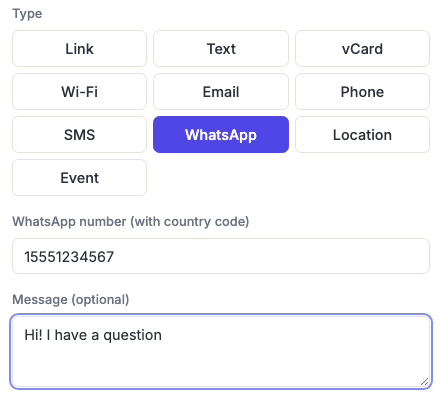
The number format is stricter here
Unlike the Phone and SMS types, WhatsApp needs the number as digits only, including the country code, with no leading +. A US number is 15551234567; a UK number drops the leading zero, so 020 7946 0958 becomes 442079460958.
This trips people up constantly, and the failure is silent — the chat simply doesn't open, or opens against the wrong number. Scan your own code and check it reaches the right chat before printing anything.
What happens if WhatsApp isn't installed
The code encodes a normal web link, so a phone without WhatsApp opens WhatsApp Web in the browser rather than failing. That's a genuine advantage over a scheme that only works with the app present, and it means the code degrades gracefully for the minority who don't use it.
When to use it
Strongest wherever WhatsApp is the default way people communicate with businesses — much of Europe, Latin America, South Asia, Africa and the Middle East. Shop windows, market stalls, service vehicles, restaurant tables, property boards, delivery notes.
The pre-filled message does the same job as the SMS keyword: Hi, I'd like to book a table or Enquiry about the blue sofa both start the conversation on the right footing and tell you where the person scanned.
A shop window or market stall is scanned from much further away than a table card, so size the printed code for that distance — see the sizing guide.
Frequently asked questions
Do I need a WhatsApp Business account?
No — this works with any WhatsApp number, personal or Business. A Business account is worth having for a real business anyway, for the profile, catalogue and automated replies, but the code doesn't require one.
Why doesn't my code open the right chat?
Number formatting, nearly every time. It must be digits only with the country code and no plus sign, and national trunk prefixes — the leading 0 in many countries — must be dropped. Scan it yourself and confirm before printing.
Does the person need my number saved first?
No. That's the main advantage over telling people to "message us on WhatsApp" — the chat opens without them adding a contact, which removes the step most people never complete.
Can I link to a WhatsApp group instead?
Not with this type, but you can with a Link code: use the group's own invite URL from WhatsApp. Bear in mind those invite links can be revoked and regenerated, which would break a printed code.
Will the pre-filled message be sent automatically?
No — it appears in the compose box and the person taps send. They can also edit or delete it first.