QR Code Types
Location QR Codes
Encodes a geographic coordinate. Scanning it opens the phone's default maps app centred on that exact point.
How to create one
- Open the Location QR code generator — it opens on the Location type with the fields ready to fill in.
- Enter the latitude and longitude as decimal degrees.
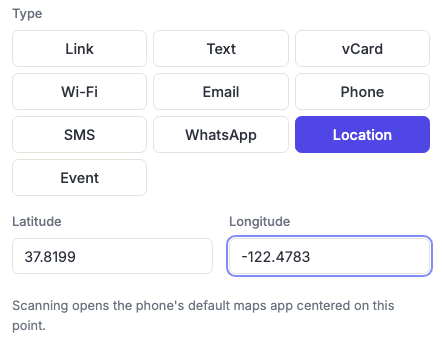
Finding your coordinates
There's no map picker yet — you enter the numbers directly. The quickest way to get them:
- Google Maps — right-click the exact spot on desktop, and the coordinates appear at the top of the menu; click to copy. On mobile, long-press to drop a pin and read them from the place card.
- Apple Maps — drop a pin and swipe up on the place card.
Use decimal degrees (37.8199, -122.4783), not degrees-minutes-seconds. Negative latitude is south of the equator; negative longitude is west of Greenwich.
These make unusually coarse, robust codes, which suits their typical home outdoors on a trail marker or gate sign. Weather and UV are the bigger threat there than density — see testing before printing.
Precision matters more than it looks. Four decimal places is about 11 metres — enough to distinguish a specific entrance. Two decimal places is over a kilometre, which will drop someone in the wrong part of a site entirely.
When a coordinate beats an address
Most of the time an address is better, because it's human-readable and people can sanity-check it. A coordinate wins specifically when there isn't a usable address:
- Trailheads, campsites, beaches, viewpoints and other rural locations.
- A specific entrance, loading bay or gate on a large site where the postal address lands you at the wrong end.
- Festival and event infrastructure — stages, gates, first aid, meeting points.
- Construction sites and new-build addresses that mapping services don't know yet.
Frequently asked questions
Does this work on iPhone and Android?
Yes — it uses the standard geo URI scheme that both platforms' cameras and maps apps understand. The phone opens whichever maps app is set as default.
Can I make it give turn-by-turn directions instead of a pin?
Not with this type, which drops a pin the person can then navigate from. If you want directions to start immediately, use a Link code with a maps directions URL — at the cost of tying the code to one mapping provider.
Can I add a label or place name to the pin?
Not currently — this encodes the coordinate only, so the pin appears unnamed. Print the place name next to the code.
Why is my pin in slightly the wrong place?
Almost always too few decimal places, or a swapped latitude and longitude. Latitude comes first and is between -90 and 90; longitude is second and ranges to ±180. If your "latitude" is above 90, they're the wrong way round.
Is a map picker coming?
It's a known request and it's on the list. It needs a map tile provider that permits commercial use, which is the part being worked out — the coordinate fields work correctly in the meantime.