Dynamic QR codes
Smart Routing
One printed code, different destinations depending on who scanned it — the App Store for an iPhone, Google Play for an Android, your website for everyone else.
The short version
- Open a dynamic code in your library and expand Routing and scheduling.
- Each routing rule is one condition plus a destination URL.
- Conditions available: operating system, device type, country, and date range.
- Rules are checked top to bottom, and the first match wins.
- Anything that matches no rule goes to the code's normal destination. There is always a fallback, so routing can never produce a dead link.
- Up to 20 rules per code. Changes take effect immediately, with nothing to reprint.
Adding a rule
In the library, each dynamic code has a Routing and scheduling section. Select Add a rule, choose what the rule matches on, fill in the value, and put the destination for that case in the URL field. Then select Save routing.
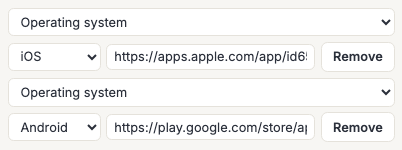
The summary line shows how many rules a code has, so you can see at a glance which of your codes are routing and which are going straight to one place.
A rule you start and leave completely blank is discarded on save. A rule with a condition and no URL is not — that gets reported as an error, because a half-finished rule silently vanishing is worse than being told about it.
What you can match on
| Condition | Values | Typical use |
|---|---|---|
| Operating system | iOS, Android, Windows, macOS, Linux, Other | App store links |
| Device type | mobile, tablet, desktop | A mobile-specific page |
| Country | Two-letter country codes, comma separated (up to 50 in one rule) | Regional storefronts, local-language pages |
| Date range | A start, an end, or both | A campaign that changes on a date |
Country codes are the standard two-letter ones — DE, FR, JP — and a single rule can list several, which matches if the scan came from any of them.
Dates are entered in your own time zone and matched to the moment, not the calendar day. A rule with only a start is "from then on"; a rule with only an end is "until then".
Order matters, and the default catches everything
Rules are evaluated from the top and the first one that matches wins — nothing further down is considered. That is why the order is preserved exactly as you write it rather than being sorted for you: a rule sending iOS to the App Store above a rule sending all mobiles to your mobile site is a deliberate arrangement, and reordering it would change what the code does.
The code's ordinary destination — the one at the top of its entry in the library — is the default. Every scan that matches no rule goes there. This is the property that makes routing safe to switch on for something already printed: the worst a mistaken rule can do is send some scans somewhere unintended, never nowhere.
A rule with no condition at all is refused rather than accepted, because such a rule would match every scan, override the default, and make every rule below it dead. That is almost always a half-built rule rather than an intention.
When we cannot tell
Some scans arrive without enough information to classify — an unusual scanner app, a browser that sends no useful identification, a country the request cannot be placed in. Those scans fall through to the default, never to a rule.
That is deliberate, and it is why "unknown" is not one of the values you can target. A rule written for real visitors quietly collecting every unidentifiable scan is a routing bug that would be very hard to notice.
Detection is a best guess in the first place. It is right for the overwhelming majority of scans and it is not a security boundary — do not use a routing rule to keep anyone away from anything. Use a password for that.
Routing and your analytics
Each scan records which rule sent it where, alongside the country, device and operating system already collected. Without that, scan counts would stop being interpretable the moment routing was switched on: two scans of the same code would mean two different destinations, and nothing would say which.
See Dynamic QR Analytics for what is recorded and how to export it.
Frequently asked questions
Do I need to reprint anything to add routing?
No. Routing lives on the code's record, not in the printed pattern. The same artwork works before and after, and you can turn routing off again by deleting the rules.
Can one rule match on two things at once — iOS and Germany?
Not today. Each rule matches on exactly one of the four conditions, and there is no way to combine them. Where the logic allows it, ordering gets you part of the way — a narrow rule above a broad one behaves like "this case first, then the general one" — but a genuine "iOS and in Germany" is not expressible yet.
Does routing slow the scan down?
Not measurably. The rules live on the same record the redirect already reads, so matching them costs no extra lookup — it is a handful of comparisons on data already in hand.
What if two rules could both match?
The higher one wins and the lower one never runs. If a rule seems to be doing nothing, check whether something above it is catching those scans first.
Can I send scans to a different destination each time, in rotation?
Not currently. Every rule is a condition on the scan itself, so the same scanner in the same circumstances always lands in the same place.
Can I set routing rules through the API?
Not yet. The API returns a code's routing rules when you read it, so you can see what a code is doing, but rules are edited in the library. Expiry and passwords are the same — readable there, editable here.
Are rule destinations checked the same way as the main one?
Yes. Every rule URL goes through exactly the same validation the code's main destination does — it must be a normal http or https web address — because a rule URL ends up in a redirect identically to the main one.