Business Accounts
Team Logos
A logo the whole team can use, that stays with the business rather than with the person who uploaded it.
The short version
- Team logos live on the Business page, under Team logos.
- Everyone on the team can put one on a code they generate.
- Admins and Writers can add one. Admins can remove any; a Writer can remove one they added.
- They are separate from your personal logos, which stay in your own account.
- They do not disappear when someone leaves the team. That is the point of them.
Adding one
Open the Business page and find the Team logos panel. Choose an image file, give it a label so your colleagues know which mark it is, and select Add team logo.
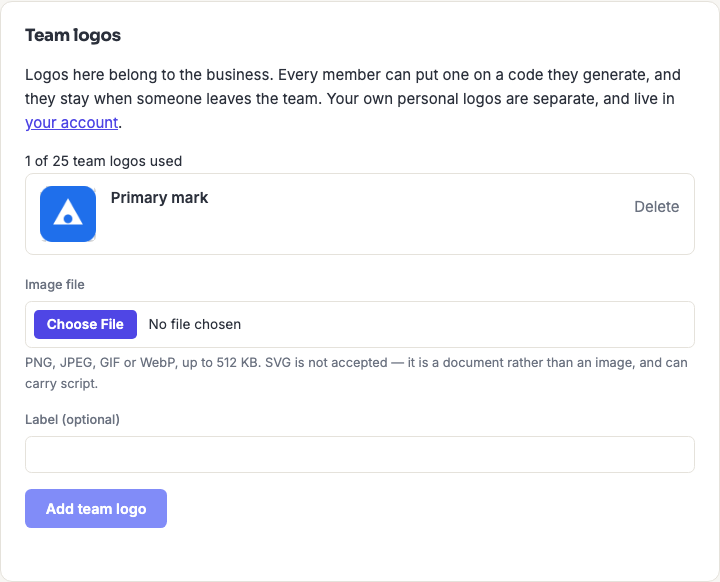
Accepted formats are PNG, JPEG, GIF and WebP, up to 512 KB. SVG is deliberately not accepted: it is a document rather than an image and can carry script, so we do not store one.
The counter above the list shows how many of your plan's team logos are in use. That allowance belongs to the business, not to whoever is looking at the page. So it does not change if one member's own plan differs.
Using one on a code
In the generator, open Import a custom logo and choose the Saved source. Your own logos and your team's appear in the same list, and the team's are marked Team so you can tell them apart at a glance, useful when the same mark exists in both places.
This works the same way in the iPhone, iPad and Android apps. Adding and removing team logos is on the website for now.
Who can do what
| Role | Use on a code | Add | Remove |
|---|---|---|---|
| Admin | Yes | Yes | Any team logo |
| Writer | Yes | Yes | Ones they added |
| Reviewer | Yes | No | No |
| Viewer | Yes | No | No |
Every role can use a team logo, including Viewer. A shared brand mark that some of the team cannot put on a code would not be doing its job.
Removing is narrower than adding on purpose: other people's codes may already carry that mark, and deleting it is not something one member should be able to do to the rest. See Roles & Permissions for how the roles work elsewhere.
Frequently asked questions
What happens to a team logo when someone leaves?
Nothing. It belongs to the business, so it stays available to everyone else, including when the person who uploaded it has their account deleted. This is the difference between a team logo and a personal one, and the reason to use a team logo for anything your colleagues rely on.
Do my personal logos become visible to my team?
No. The two lists are entirely separate. Uploading to one never puts anything in the other, and nobody on your team can see the logos in your account.
Can I move a personal logo to the team?
Not in one step, upload it again on the Business page. It is a small amount of duplication in exchange for the two libraries never being able to leak into one another.
Does a team logo change codes that already exist?
No. A saved code keeps the logo it was made with. Removing a team logo does not alter any code already generated or downloaded. But it will stop being available to put on new ones.
Why can't I add one?
Adding is limited to Admins and Writers. If you are a Reviewer or Viewer the form is not shown, and an Admin on your team can add it for you.