QR Code Types
Email QR Codes
Opens the scanner's email app with a new message already addressed to you — and, if you want, with the subject and body pre-filled.
How to create one
- Open the Email QR code generator — it opens on the Email type with the fields ready to fill in.
- Enter the destination address.
- Optionally add a subject and body — both are prefilled into the draft, and both are editable by the sender.
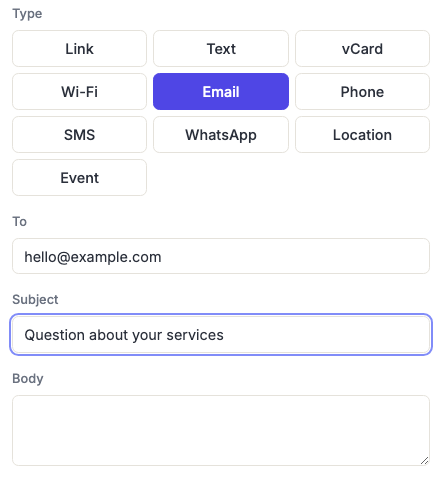
Use the subject line as a routing tag
The most useful thing about this type is the pre-filled subject, and most people waste it.
A subject that identifies where the code was scanned turns your inbox into a working attribution system with no analytics of any kind: Enquiry — trade show booth on the booth, Enquiry — brochure in the brochure, Repair request — Unit 4B on the appliance. Same address, different codes, and you can tell them apart at a glance.
A pre-filled body works the same way for structured requests — a short template with the fields you always end up asking for anyway.
What the sender sees
Everything you prefill is fully editable before sending, and the sender can see all of it. Don't put anything in the body you wouldn't want them reading or changing — it's a convenience, not a hidden field.
The draft opens in whatever the phone's default mail app is. If someone has no mail app configured, nothing useful happens — which is the main reason to pair this with a visible written address on printed material.
Subject and body are both encoded into the pattern, so a long template makes for a dense code. If it stops scanning reliably at the size you need, that's why — see common scanning failures.
Frequently asked questions
Does this send an email automatically?
No, and it can't. It opens a draft the person has to send themselves. No message is sent without them tapping send, which is exactly the behaviour you want anyway.
Can I add multiple recipients or a CC?
Not from here — one address. If you need a shared destination, use a group or alias address that forwards to everyone.
Nothing happened when I scanned it. Why?
Usually no default mail app is configured on that phone, which is common on devices where people use webmail only. It's why a printed address alongside the code is worth the space.
Does a long body make the code harder to scan?
Yes — the entire subject and body are encoded in the pattern, so a long template makes the code noticeably denser. Keep it to a few lines, or link to a form instead.
Should I use this or a link to a contact form?
Email is better when you want a real conversation and don't want to build anything — replies come to your inbox and threading just works. A form is better when you need structured data or the volume is high enough that triage matters.