Dynamic QR codes
Scan Caps, Expiry & Passwords
Four different reasons a dynamic code might stop forwarding — and four different pages the person scanning it sees.
The short version
| Control | Set by | Reversible |
|---|---|---|
| Scan cap | Your plan, when the code is created | Only by upgrading and making a new code |
| Expiry date | You, per code | Yes — change or clear the date |
| Password | You, per code | Yes — Clear removes it |
| Pause | You, per code | Yes — Resume |
Expiry and password live under Routing and scheduling on the code's entry in your library, next to smart routing. Pause is a button on the entry itself.
None of these ever produces an error or a dead page. A code that is not forwarding shows a real page explaining why, and keeps existing so you can bring it back.
Scan caps
A dynamic code on the Basic plan carries a cap of 500 scans. Once it has forwarded 500 people, it stops, and everyone who scans it afterwards sees a page saying the code has stopped redirecting. Paid plans have no per-code cap.
The cap is stamped on a code when it is created, from the plan you were on at that moment. Upgrading afterwards does not lift the cap on a code you already made — it stays on the terms it was created under, rather than silently changing what a printed code does. New codes you create after upgrading are uncapped.
The page a capped-out code shows is written for the person scanning it, who is usually a stranger with no relationship to your plan. It tells them the code has stopped forwarding, and offers them a way to make their own. A second line addressed to you — "Is this your code?" — links to your library, which an owner recognises instantly and a stranger reads past.
Counting is exact. Two people scanning at the same instant on the last remaining scan cannot both get through.
Expiry date
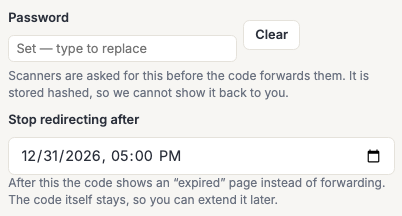
Set Stop redirecting after to a date and time and the code forwards normally until then. After it, scanners see a page saying the code has expired.
The date is entered in your own time zone, and it is a moment rather than a whole day — a code set to expire at 17:00 stops at 17:00.
An expired code still exists. Nothing is deleted, the short link is not released, and you can extend the date or clear it entirely to bring the code back. That is the whole difference between expiry and deletion, and it is why expiry is safe to put on something already printed.
An expired code does not consume its scan allowance either. If you are on a plan with a scan cap and a code expires with scans left, those scans are still there if you extend it.
Password protection
Type a password into the Password field and save. From then on, scanning the code shows a page asking for it, and forwards only once it is entered correctly. Anyone who gets it wrong is asked again.
The password is stored hashed, which means we cannot show it back to you — the field always starts empty, and leaving it empty means "leave the password as it is". Clear is what removes protection. If you forget a password, set a new one; there is nothing to recover.
It is asked for on every scan, not once per person. A QR scan is a fresh intent each time, usually from a camera app and often on a different phone, so there is no session to remember — which is also what a password on a printed code is normally understood to mean.
Use it for the things a lock is actually for: an internal document, a page for event attendees, a menu that should not be public before opening night. It is a barrier to casual access, not a secure channel — anyone who knows the password can pass it on.
Choosing one: between 4 and 128 characters. Short is allowed on purpose, because a password on a printed code is often read aloud to a room — but a short password is a weak one, so use something longer for anything that matters.
Which one happens first
A code can be in more than one of these states at once, and the order they are checked in is deliberate:
- Paused — a paused code reads as paused, whatever else is true of it. That is the state you chose most recently.
- Expired — telling someone a campaign has ended is more use than a password prompt for a code that would refuse them anyway.
- Password — asked before the scan is counted, so a wrong guess never spends one of a capped code's scans.
- Scan cap — checked last, and only ever consumed by a scan that was going to be forwarded.
That third point matters more than it looks: if guesses burned scans, a stranger could take a capped code off the air just by guessing at it, and your analytics would count attempts that never reached your destination.
Frequently asked questions
Does a blocked scan still show up in my analytics?
A scan that is not forwarded is not a scan of your destination, and is not counted as one. Wrong password attempts in particular are not recorded as scans.
I upgraded my plan. Why is my old code still capped?
Because its terms were fixed when it was created. A code that silently changed what it did when your plan changed would be worse than one whose behaviour is settled — but a new code made now will have no cap.
Can I raise the cap on an existing code?
No. Create a new dynamic code on an upgraded plan and update whatever the old one was printed on. If the artwork is already out in the world, that is exactly the case expiry and pausing exist for.
What does a scanner see — an error?
No. Every one of these shows a normal page in the browser that explains the situation and offers a way onward. Nothing 404s, and nothing looks broken.
Can I password-protect a static code?
No. A static code carries its destination inside the pattern itself, so there is nothing in the middle to ask a question. This is one of the things dynamic codes are for.
Does the password prompt work without JavaScript?
Yes. It is an ordinary form, so it works on a locked-down phone, in a scanner's built-in browser, and anywhere else a plain page loads.
Can I set expiry or a password through the API?
Not currently. The API reports whether a code is password-protected and when it expires, so you can audit your codes from it, but both are set in the library.