Customizing your QR code
Minimum Size
Codes normally use the smallest grid their content fits into. This control sets a floor under that, useful when a set of codes needs to match, or when a logo needs more room.
The short version
- A QR code's grid size is its version, numbered 1 to 40. Version 1 is 21×21 modules; version 40 is 177×177.
- The Minimum size slider starts at Automatic, which picks the smallest version that fits your content.
- Raising it is a floor, not a fixed size. Ask for version 5 and a long URL will still use version 8 if that is what it needs.
- The note under the slider tells you what the code actually came out as, which is not always what you asked for.
- Minimum size is saved with the code and works the same in the apps.
What a version actually is
A QR code is a grid of squares, modules, and the grid comes in forty fixed sizes. Each step up adds four modules to each side and holds more data. The encoder picks a version by measuring your content against the capacity of each size and taking the first one that fits.
That is why two codes made from different content come out different sizes on screen even though the box around them is the same. A phone number is a handful of characters; a full vCard with an address and an organization is hundreds, and needs a much finer grid to hold them.
Every code here is built at error correction level H: the highest of the four, which is what makes a logo possible at all. And which also costs capacity. A version holds noticeably less at level H than it would at the lowest level, so codes here reach for a larger version sooner than a generator using level L would.
Why it is a floor and not a fixed size
Pinning a code to an exact version would break the moment the content outgrew it, and it would break badly: the encoder cannot fit the data and simply fails, so you would be left with a control that silently works until one day it produces nothing at all.
A floor cannot do that. Ask for at least version 10 and you get version 10, unless your content needs more, in which case you get what it needs. Raising the floor can never make a code fail; it can only make it larger.
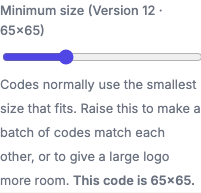
Because of that, the slider says what you asked for and the line underneath says what you got. Those are two different numbers whenever the content needs more room than the floor allows, and showing only the first was actively misleading — a long URL with the floor at 1 would read "Version 1 · 21×21" beside a code that was actually 113×113.
When to raise it
A set of codes that should match
This is the main reason the control exists. Make ten table cards, each with a different link, and they will come out at whatever version each link happens to need, so the modules end up visibly different sizes across the set even at identical print dimensions. Set a minimum high enough for the longest of them and they all land on the same grid.
Room for a logo
A logo destroys the modules underneath it, and the decoder rebuilds them from the redundancy level H provides. A finer grid means the same physical logo covers more modules but a smaller share of any single block, which is generally easier to recover. If you are getting a density warning on a code with a logo, raising the minimum size is one of the two fixes. The other is shortening the content. See Shapes & Logo Embedding.
A deliberately coarse look
Rarely, a chunky low-version code is the design you want, and the content is short enough to allow it. There is nothing to do in that case: Automatic already gives you the smallest grid that fits.
What it costs
A bigger version at the same printed width means smaller modules, and small modules are the most common cause of a code that will not scan. A version 20 code printed at 2 cm has modules around a fifth of a millimeter — below what most phone cameras resolve at arm's length.
So raising this is a trade, not an improvement. If you raise the minimum, either keep the printed size the same and check it still scans, or print it larger. The full sizing guide has the distance-to-size arithmetic.
Frequently asked questions
Does raising the minimum size make a code hold more data?
No. It makes room for more, but your content is unchanged. The extra capacity is filled with padding. Nothing about the code's meaning changes.
Will a higher version scan better?
Not on its own, and usually the opposite at a fixed print size, because the modules get smaller. The one case where it genuinely helps is a large logo on a dense code.
What happens if my content needs more than the floor I set?
You get the version your content needs. The floor is ignored when it is too low, which is exactly what "minimum" means here.
Is the setting kept when I save a code?
Yes. Minimum size is stored with the code and comes back when you reload it, on the website and in the apps alike.
Can I set a maximum instead?
No, and there is no useful version of that control. A maximum would have to fail when content exceeded it, and a generator that refuses to make your code is not more helpful than one that makes a bigger one.